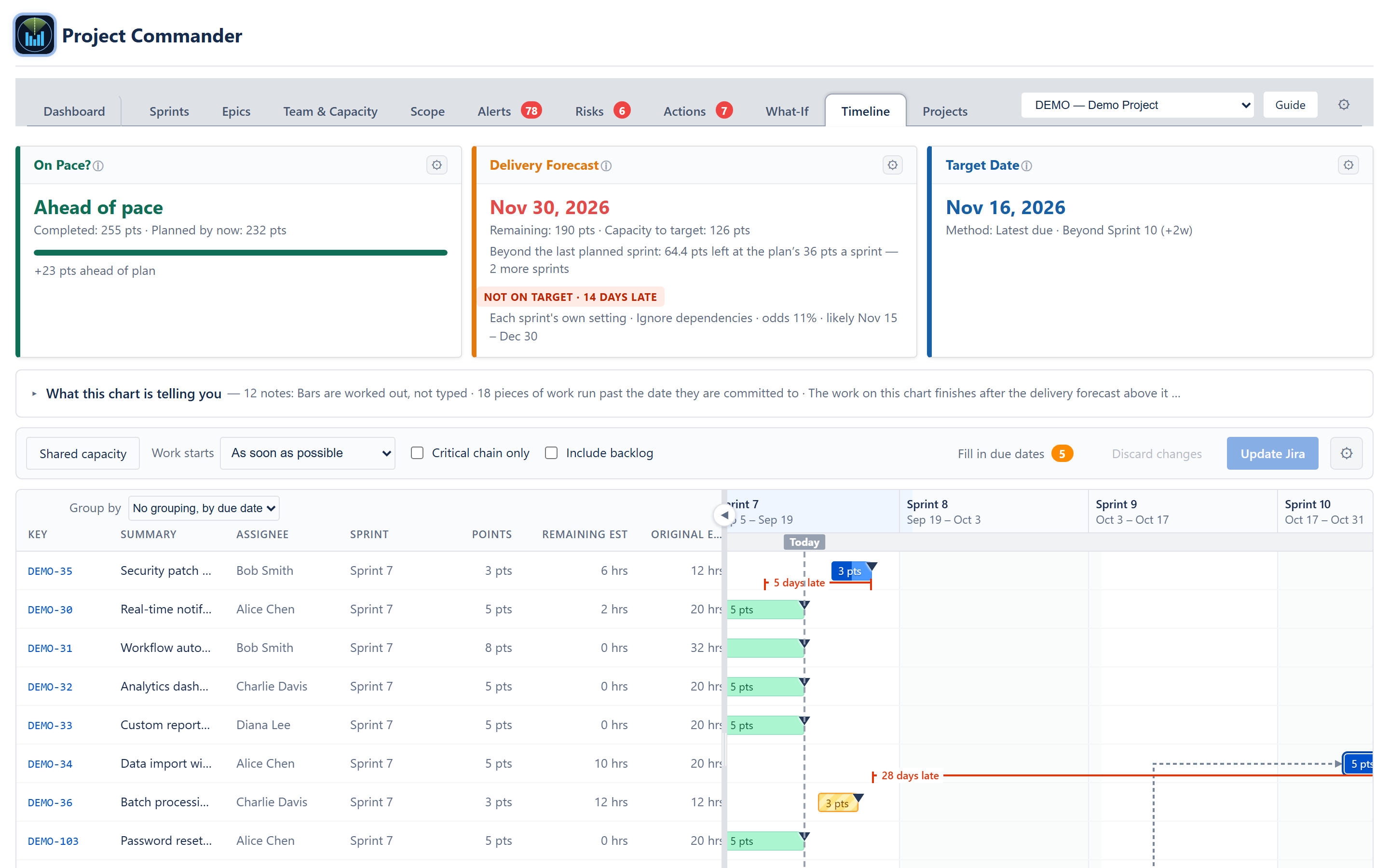
The planning layer Jira is missing. Whether you use sprints or Kanban, story points or time estimates — get total visibility into your project.
Works with Jira Cloud · Full-page app or dashboard gadget
Compare capacity vs demand over time. See at a glance whether your timeline is realistic before you commit.
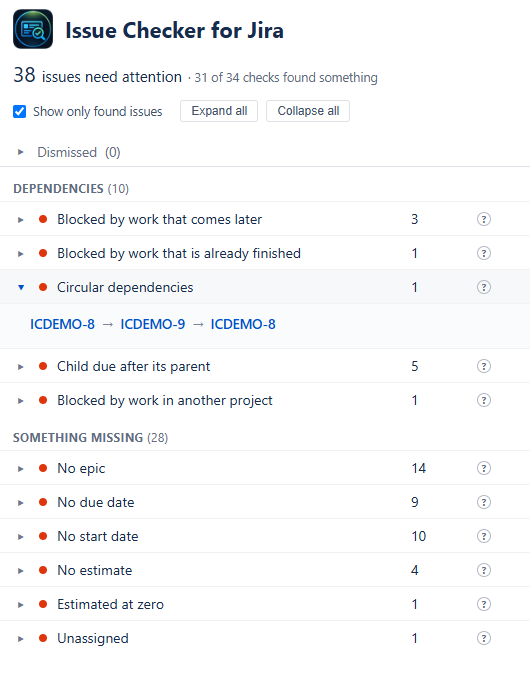
Surface issues that need attention: overdue items, missing estimates, dependency violations, and blocked work.
Track completion percentage and velocity trends. Know where you stand against the plan at any moment.
Track time spent vs capacity to see if work is progressing as planned. Spot lagging teams or sprints before deadlines slip.
Ask AI anything about your project. Explore scenarios, get standup summaries, identify risks, and plan your next move.
Answer the critical question: "Can we deliver by the deadline?" Visualize demand vs capacity over time with scope and time spent tracking. Filter by period to zoom in on weekly, monthly, or quarterly views.
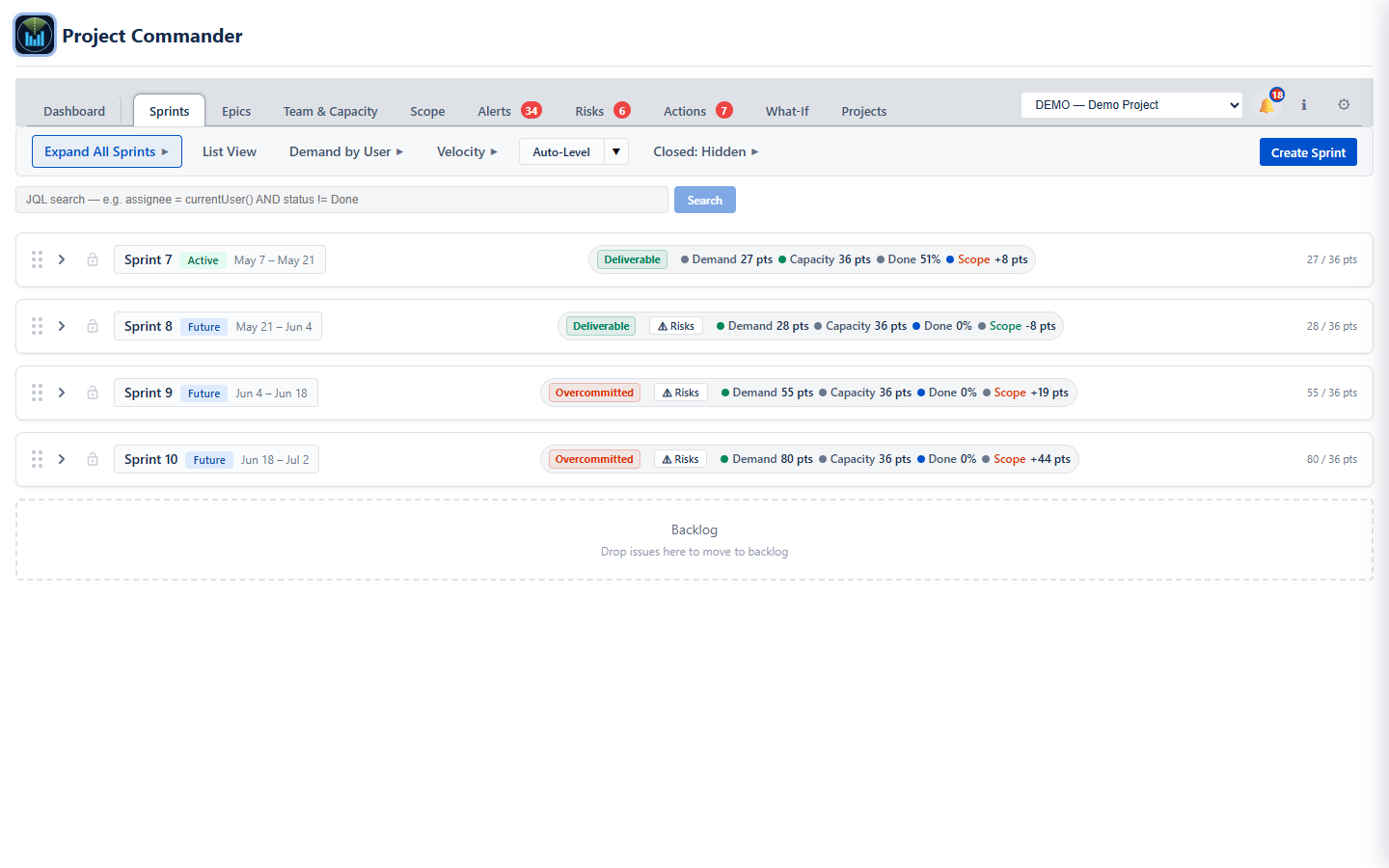
Set limits per sprint or per user. Visual warnings flag over-capacity sprints and oversized issues that exceed your limit.
Track team velocity across completed sprints. See expected points, efficiency trends, and per-user performance. Plan sprints based on actual historical capacity, not guesswork.
Choose your strategy: move by priority, size, or due date. Respects dependencies and prefers sprints that fit issue deadlines. Undo if needed, or accept to finalize.
See instantly when a blocker is scheduled after the issue it blocks. Fix scheduling conflicts before they cause delays.
Use story points or remaining estimates (hours/days). Project Commander works with your preferred metric.
See percentage of work remaining in each sprint. Choose between original estimate or work ratio calculations.
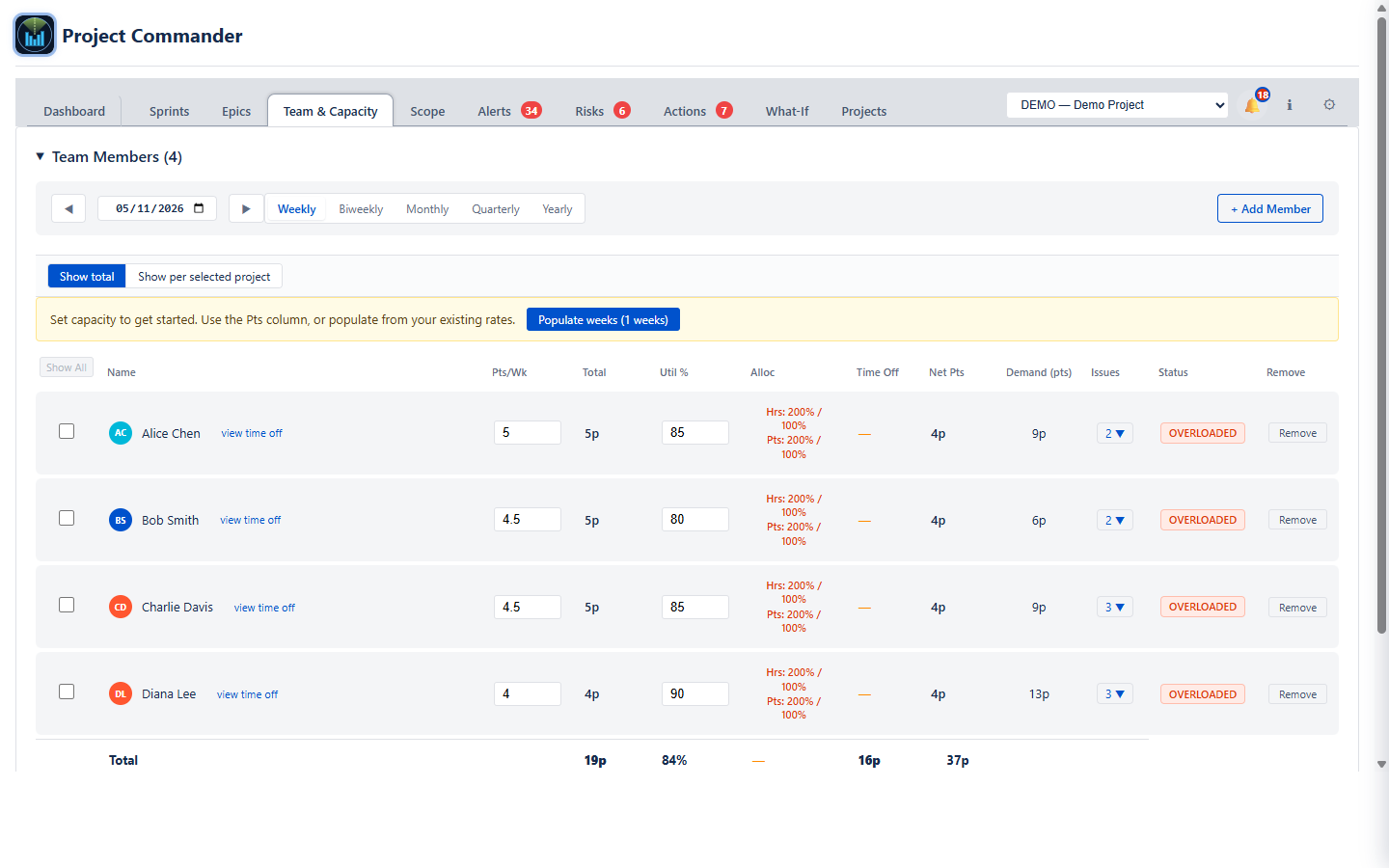
See each team member's capacity at a glance. Status indicators show OVERLOADED, OPTIMAL, or AVAILABLE. Account for holidays and time off automatically.
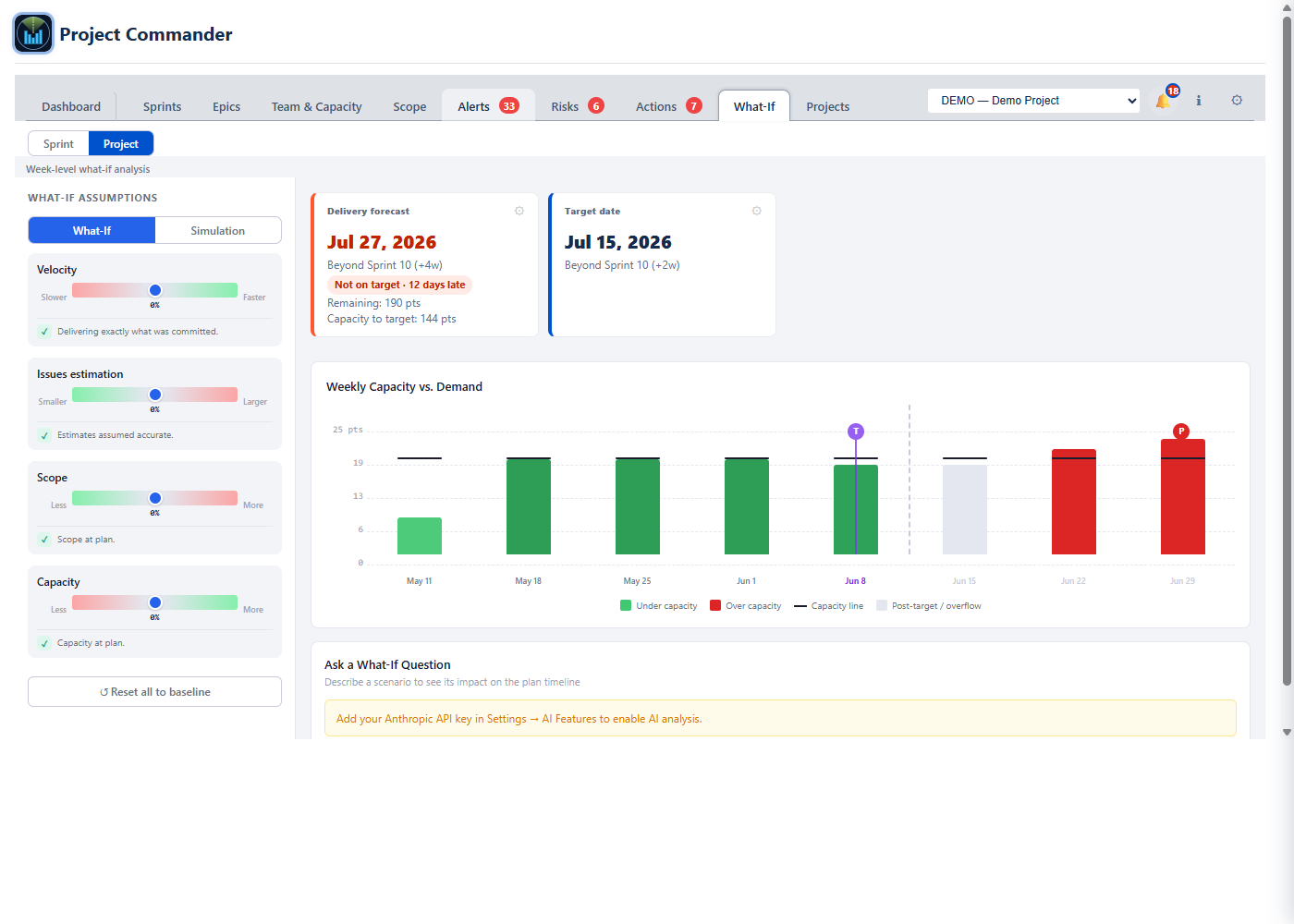
AI-powered sprint analysis including "What If?" scenario planning, blocker prediction, standup summaries, retro insights, and refinement checks. Ask questions like "What if we add 15 more points?"
Monitor scope changes over time with visual charts. See when issues were added mid-sprint and track original vs current scope with period filtering.
Historical trends visualization showing velocity patterns, completion rates, and team performance over time. Identify patterns before they become problems.
Centralized view of all issues with problems: overdue items, missing estimates, dependency violations, and blocked work. Fix issues before they derail your sprint.
Plan sprints with drag-and-drop issue management. Each sprint shows capacity usage (6/242 hrs), per-user workload breakdowns, scope change tracking, and action buttons for completing sprints and syncing due dates. Auto and Manual capacity modes let you choose how limits are set.
Track team velocity across completed sprints. See average velocity, expected capacity, hours per week, efficiency, and completion rates. The historical table shows each sprint's length, capacity, completed work, and per-week productivity for data-driven planning.
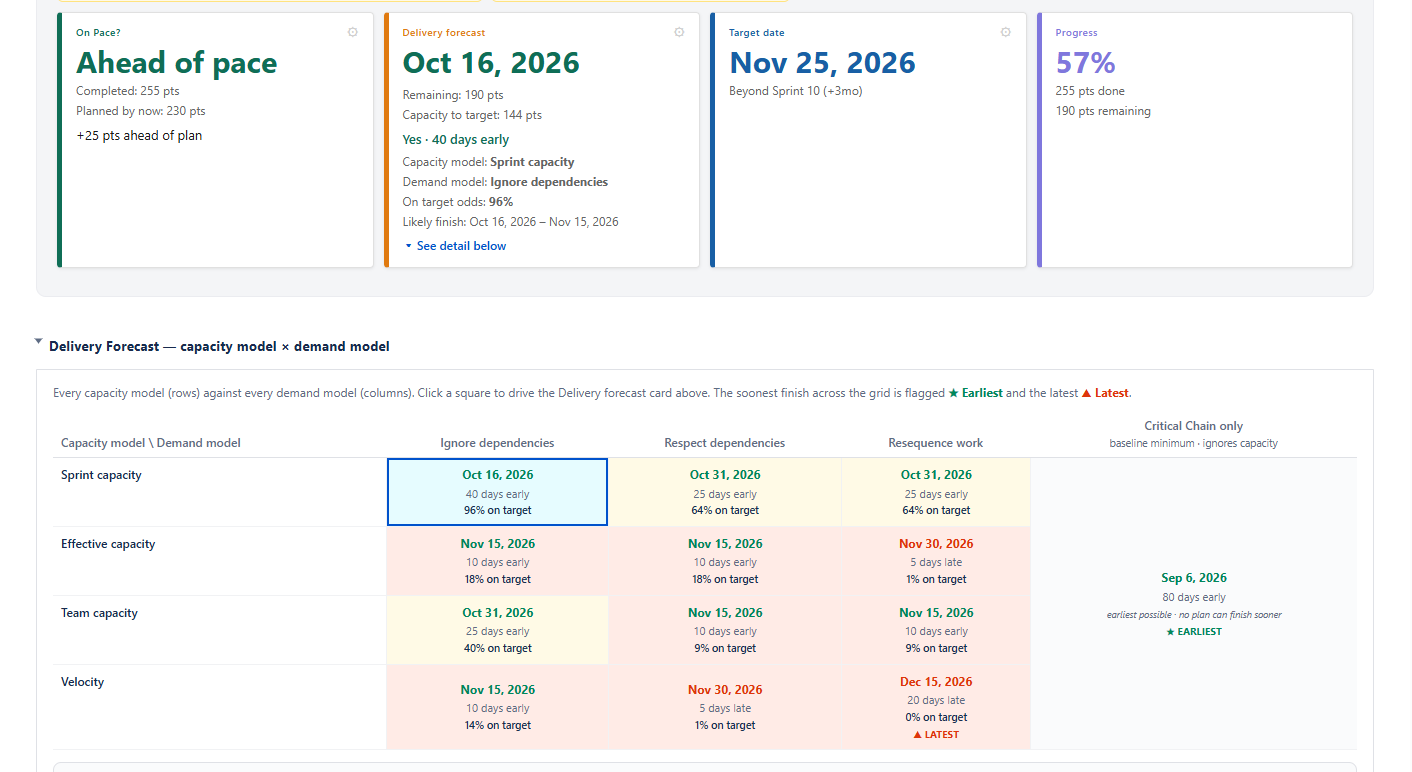
Nine stat cards answer key questions at a glance: Total Demand, Total Capacity, Time Spent, Buffer, Feasibility score, and Confidence level on the first row. Percent Complete, Work Ratio, and Efficiency on the second. Filter by period (All Time, Weekly, Monthly, Quarterly, Yearly) and by team member.
Interactive chart showing daily capacity (green), daily demand (blue), and daily time spent (orange) over time. Set a target date to see the projected completion forecast — here the project completes March 27, 32 days late. Toggle cumulative views, scope trace, and sprint markers from the legend.
See each team member's weekly hours, utilization percentage, time off, net available hours, current demand, and assigned issues. Status badges instantly show who is OVERLOADED, OPTIMAL, UNDERLOADED, or AVAILABLE. Filter by weekly, biweekly, monthly, quarterly, or yearly periods.
Interactive calendar for managing team time off. Click to select days, Ctrl+click to toggle, Shift+click for ranges. Color-coded entries show weekends, holidays, individual time off, and selected dates. Company holidays section manages recurring and one-time holidays.
Visual scope tracking with total scope, burned, and remaining stat cards. The burndown chart shows scope growth (blue) vs work completed (green) over time, with per-assignee burndown lines. Toggle sprint markers and completed sprints for additional context.
Period-by-period breakdown showing issues added, work burned, and remaining hours for each week. Switch between weekly, biweekly, monthly, or quarterly views. Expand any row to see the individual issues that were added or completed in that period.
Centralized dashboard showing all issues that need attention, organized into collapsible categories: Done with Remaining Work, Overdue, Dependency Conflicts, Child After Parent, Missing Dates, and Missing Estimates. Summary counts show errors vs warnings at a glance.
Track which issues have had their due dates pushed back. Stat cards show total delayed issues, average change, total reschedules, and maximum delay. Sort by total delay, number of changes, or most recent. Expand any issue to see its full change history.
Monitor how estimates evolve over time. See which issues have been re-estimated, the average change amount, total re-estimates, and the biggest single change. Sort by total change, number of revisions, or most recent to spot estimation patterns.
Six AI agents monitor your project continuously: Scope Creep Monitor, Blocker Prediction, Standup Summarizer, Refinement Assistant, and Retro Insights. The overview shows each agent's status and recent actions. Switch to What If?, Scope Monitor, Blockers, Standup, Retro, Refinement, or Planning tabs for detailed analysis.
See what you're missing with the built-in backlog view
| Feature | Jira Native | Project Commander |
|---|---|---|
| View sprints & issues | ✔ | ✔ |
| Drag-drop between sprints | ✔ | ✔ |
| Multi-select drag & drop | ✘ | ✔ batch moves |
| Story points display | ✔ | ✔ |
| Feasibility analysis | ✘ | ✔ capacity vs demand chart |
| Team capacity with time off | ✘ | ✔ holidays, PTO, utilization |
| Works without sprints | ✘ | ✔ JQL-based mode |
| Capacity limits per sprint | ✘ | ✔ with warnings |
| Per-user capacity tracking | ✘ | ✔ |
| Remaining Estimate metric | ✘ | ✔ hours/days |
| Progress indicator | ✘ | ✔ % remaining |
| Auto-level sprints | ✘ | ✔ dependency-aware |
| Auto-level strategy selector | ✘ | ✔ priority/size/date |
| Date-aware scheduling | ✘ | ✔ respects deadlines |
| Oversized issue warnings | ✘ | ✔ |
| Dependency warnings | ✘ | ✔ |
| Sync dates to sprints | ✘ | ✔ |
| Work by user summary | Limited | ✔ with filtering |
| Collapse/reorder sprints | ✘ | ✔ |
| Full-page app & dashboard gadget | ✘ | ✔ both modes |
| Delete sprints with issues | ✘ | ✔ with move options |
| Editable sprint goals | View only | ✔ click to edit |
| Velocity tracking | ✘ | ✔ team & per-user |
| Sprint completion rollover | Manual only | ✔ with options |
| AI-powered insights | ✘ | ✔ What If?, blockers, standups |
| Scope creep tracking | ✘ | ✔ with timeline charts |
| Trends analysis | Limited | ✔ velocity & performance |
| Alerts dashboard | ✘ | ✔ centralized issue alerts |
Interactive guided tour of Project Commander's features
Project Commander is coming soon to the Atlassian Marketplace.
Stay tuned for availability on Jira Cloud.