Jira Capacity Planning Apps Compared
Project Commander is an add-on for Jira, not a replacement for it. It installs into your own Jira site, reads the projects, sprints, issues, people and links you already keep there, and leaves Jira as the place the work lives. The only things it stands in for are the planning and capacity features of Jira Premium and the delivery reporting of Rovo — see the side-by-side comparison.
New — the Timeline tab. A Gantt chart nobody has to maintain: every epic and issue drawn as a bar where the forecast puts it, from the size of the work, who has it, the hours they really have, their booked time off and what blocks what. Sprints across the top, dependency arrows between the bars, the critical chain on one tick, and the same target and forecast dates as every other screen. See what it does →
This is a guide for someone who has not yet picked a capacity planning app for Jira. It covers Jira Premium's own Plans, Tempo Capacity Planner, Portfolio by HeroCoders, ActivityTimeline, Planyway and Project Commander: what each one was built to answer, what it does well, and what it leaves out. Every statement about another product comes from that product's own documentation or Marketplace listing, read on 5 September 2026, and each product has a full page of its own linked below with the sources listed.
First, which question are you asking?
"Capacity planning" covers two different questions, and the apps split cleanly between them.
Who is booked on what, and is anyone over? This is a scheduling question. The answer is a timeline of people and days, coloured where the hours on a day exceed the hours a person has. Tempo, Portfolio, ActivityTimeline, Planyway and Jira Premium's Capacity view all answer it, each in its own way.
Can this be delivered by the date with the people we have? This is a feasibility question. The answer is a verdict on each sprint, a finish date with odds, the person who becomes the bottleneck, and what to change. A timeline cannot answer it, because the timeline shows the plan you typed, not what happens when the plan meets the team's real variation. Project Commander was built for this question.
Most teams need both. The point of sorting the apps this way is that a scheduling app and a feasibility app are not substitutes, and a team that buys one expecting the other will be disappointed.
Jira Premium: Plans and the Capacity view
Built to answer: when is each piece scheduled, across which teams, and does the sprint's typed capacity hold it? And, in the newer Capacity view, how have I allocated each person's hours this week?
What it does well: a native roadmap across many teams with a hierarchy above the epic, saved scenarios, an auto-scheduler that fills a whole portfolio in one pass, and nothing to install.
What it leaves out: capacity is one number per team per sprint shared out equally, or typed hours against a fixed forty-hour week, with no time off. A sprint's bar turns red when work exceeds the typed number; there is no percentage, no verdict and no forecast with odds. Its dependency lines turn red when the lead-in item is late, and two items that block each other are recognised only by being left out of the auto-scheduler's result, never raised as something to fix. Plans is available on Premium and Enterprise only.
Full page, with Atlassian's documentation as sources: Project Commander vs Jira, Jira Premium and Rovo.
Tempo Capacity Planner
Built to answer: how many hours is each person planned for, on what, this week and next, and is anyone planned past their hours?
What it does well: planning people's hours by the day across a whole organisation, with per-country working-hour and holiday schemes, recurring plans, placeholder people you have not hired yet, skills, requests for time between teams with an approval step, and, with Tempo Timesheets bought alongside, planned hours beside logged hours.
What it leaves out: the capacity is compared with hours a manager types into a plan, not with the work assigned in the sprint. Its pages describe no finish date, no probability, no verdict on the sprint, no reading of Jira's change history or dependency links, and no risk register.
Full page, with Tempo's help centre as sources: Project Commander vs Tempo Capacity Planner.
Portfolio by HeroCoders
Built to answer: where does every epic and work item sit across projects, how far along is each parent, and on which days is each person booked past their hours?
What it does well: an inline-editable, spreadsheet-like table across every project with roll-ups, time in status, custom formulas and budgets; a Gantt with dependencies and lag times; and a capacity planner that spreads a work item's Original Estimate over the days between its booking dates, marking overbooked days red. It is built on Forge and stores none of your data with the vendor.
What it leaves out: every item needs booking start and end dates before it counts. Its calculated end date is the latest child's typed end date, a roll-up rather than a forecast, and its pages describe no probability. Its warnings are an overbooked person, a child ending after its parent, and an item past due that has not started. Rearranging is by drag and drop, with no preview of the whole plan before and after.
Full page, with HeroCoders' help centre as sources: Project Commander vs Portfolio by HeroCoders.
ActivityTimeline
Built to answer: who is scheduled on what, day by day, is anyone over their hours on a given day, and what did they log?
What it does well: a drag-and-drop timeline of people and days that puts the hours from remaining estimates onto each working day, with holidays, days off, sick leave, business trips, part-time schedules and overtime; timesheets with approvals in the same app; skills; and, in its Advanced edition, cost and revenue from logged hours. Its pricing page lists $2.50 a user a month at 11 to 100 users.
What it leaves out: its "resource forecasting" means who will be free when, not when the work will finish. Its pages describe no finish date, no probability, no verdict on the sprint, no reading of change history or dependency links, and no risk register.
Full page, with ActivityTimeline's own site as sources: Project Commander vs ActivityTimeline.
Planyway
Built to answer: what is on the roadmap across boards, who is doing what this week, whose days are over their hours, and what time was logged?
What it does well: a roadmap and a team calendar in one, at a day, week, month or year scale, with a workload heat map against the daily hours you set, time off blocked out, every drag written back to Jira, time tracking with a timer, PDF export and shared live views. It also runs on Trello and GitHub. Its AI Risk Agent, built on Atlassian Rovo, flags items it judges at risk and says why.
What it leaves out: its pages describe no finish date and no probability; the Risk Agent flags and explains but does not state a date or odds. Dependencies are drawn on the roadmap, not checked for loops or for work blocked by a later sprint. There is no verdict on the sprint and no risk register.
Full page, with Planyway's own site as sources: Project Commander vs Planyway.
Project Commander
Built to answer: can this be delivered by the date with the people we have, and if not, where, by how much, and what do we do?
What it does: capacity is worked out per person, in hours a week or points a sprint, with each person's share of the project, booked time off and company holidays taken off, and compared with the work actually assigned in each sprint. Every sprint reads Deliverable, Tight or Overcommitted with a percentage, and the running sprint is judged on what is left against what is left. The forecast walks the plan sprint by sprint, names the bottleneck, then runs the plan 250 times and reports the odds of hitting the target and a likely range. Scope creep is rebuilt from Jira's change history. Dependency conflicts, missing data and overloaded people are alerts with a way to resolve them. Auto-Level rearranges the sprints to fit and shows the whole plan before and after, writing nothing to Jira until you accept. Every number is arithmetic, and no AI model is asked for any figure or any word. It is not only for sprints: with Sprint Mode off in a project's settings, a Kanban or date-planned team's work is read from its Issue filter and judged week by week against capacity for a period of a length you choose, on the same screens.
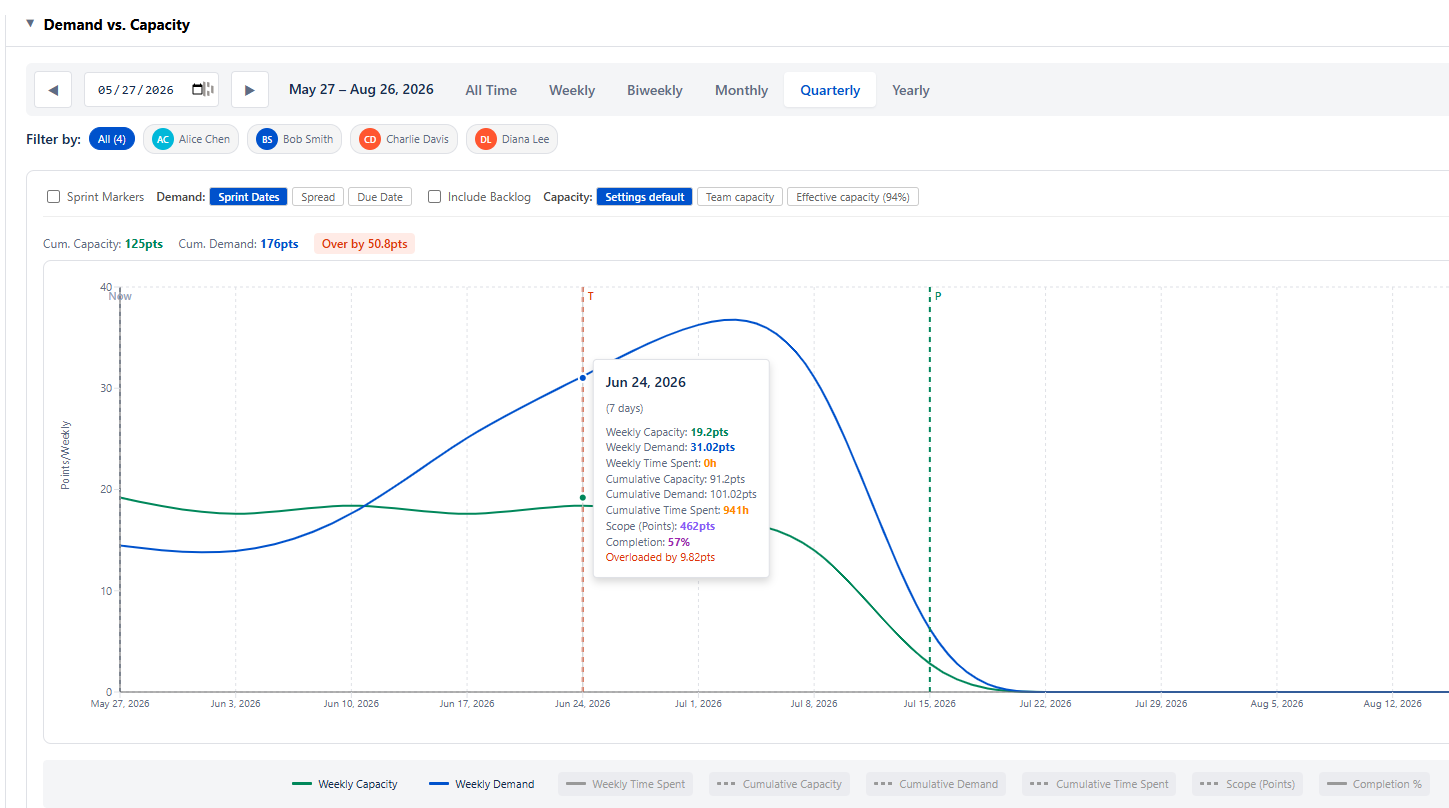
What it leaves out: it does not place individual tasks on days, keeps no timesheet, has no money in it, and does not match people to work by skill. The Timeline tab draws every epic and issue as a bar on a calendar, each bar where Project Commander's own schedule puts the work, with the target date, the forecast date and the likely finish range on the same picture, red where work runs past the date it is committed to. Teams that need those keep a scheduling app and use Project Commander to check whether the sprints it feeds are deliverable.
All six, side by side
| Jira Premium | Tempo | Portfolio | ActivityTimeline | Planyway | Project Commander | |
|---|---|---|---|---|---|---|
| The question it answers | Where is each piece scheduled | Who is planned for how many hours | Where does everything sit, who is overbooked | Who is scheduled each day, what was logged | What is on the roadmap, who is over | Can it be delivered by the date |
| Capacity per person with time off and holidays | One number per team; typed hours, fixed 40-hour week | Yes, by the day | Yes, by the day | Yes, by the day | Yes, daily hours | Yes, per sprint |
| Demand read from the work in the sprint | — | From hours a manager planned | From estimates spread over booking dates | From remaining estimates, by the day | From estimates, by the day | Yes, in the team's own unit |
| Verdict per sprint with a percentage | A bar that turns red | — | — | — | — | Deliverable / Tight / Overcommitted |
| Forecast finish date with odds | A scheduled placement | — | Latest child's typed end date | — | — | Yes, 250 runs |
| Scope creep from change history | — | — | — | — | — | Yes |
| Dependency loops and blocked-by-later work | Lines; one turns red when late | — | Lines with lag; child-after-parent alert | — | Lines on the roadmap | Yes, as alerts |
| Rearranging work to fit, with a preview | Auto-scheduler; changes staged, saved on Review changes | By hand | Drag and drop | Drag and drop | Drag and drop, written at once | Auto-Level, preview first |
| Works without sprints (Kanban, date-planned) | Yes | Yes | Yes | Yes | Yes | Yes, Sprint Mode off |
| Roadmap or Gantt | Yes | — | Yes | Timeline of people | Yes | Yes — the Timeline tab, bars placed by the forecast |
| Timesheets | — | With Tempo Timesheets | — | Yes | Yes | — |
| Risk register | — | — | Row warnings | — | AI flags | Yes |
| Data stays in Jira | Yes | Not stated | Yes, Forge | Not stated | Not stated | Yes, Forge |
How to choose
- You plan people's hours across an organisation and bill for them. Tempo Capacity Planner, especially if you already run Tempo Timesheets.
- You want one table and one Gantt over every project, with budgets. Portfolio by HeroCoders.
- You schedule by the day and need timesheets in the same app. ActivityTimeline.
- You want a roadmap and a team calendar in one, possibly across Trello and GitHub too. Planyway.
- You are on Jira Premium and want a native cross-team roadmap. Plans, with the capacity caveats above.
- You have to commit to a date and need to know whether the sprints hold. Project Commander, on its own or beside any of the above.
See whether your plan holds
Project Commander is a Forge app on the Atlassian Marketplace, free during its public beta — it installs in about two minutes and reads a live Jira project right away. Or try the interactive demo first, no install needed.
Related reading: Sprint capacity planning in Jira · One Jira app instead of a stack of add-ons · FAQ