Sprint Capacity Planning in Jira
Project Commander is an add-on for Jira, not a replacement for it. It installs into your own Jira site, reads the projects, sprints, issues, people and links you already keep there, and leaves Jira as the place the work lives. The only things it stands in for are the planning and capacity features of Jira Premium and the delivery reporting of Rovo — see the side-by-side comparison.
New — the Timeline tab. A Gantt chart nobody has to maintain: every epic and issue drawn as a bar where the forecast puts it, from the size of the work, who has it, the hours they really have, their booked time off and what blocks what. Sprints across the top, dependency arrows between the bars, the critical chain on one tick, and the same target and forecast dates as every other screen. See what it does →
This page is a working guide to Jira capacity planning: how to set capacity in Jira itself, exactly what Jira's own capacity planning covers, the six things it does not, and how to close each gap. Every statement about Jira here comes from Atlassian's own documentation.
What capacity planning in Jira actually means
Capacity planning answers one question: does the work you have committed fit the time the team really has? Two numbers, compared.
Demand is the work assigned to a sprint or a period — the sum of its estimates, whether those are story points, hours or days.
Capacity is how much that team can actually get through in the same period. Not how much they got through on their best sprint, and not how many hours are theoretically in the week — how much time they genuinely have, after holidays, leave, and the part of their week that goes to other projects.
When demand is below capacity the plan fits. When it is above, something will be late, and the only question is what. Most teams check this by adding up a sprint's story points and comparing the total to their average velocity. That is a rough version of the same idea, and it hides the two things that sink sprints most often: one person being overloaded while the team total looks fine, and the days of a sprint that have already gone.
How to set capacity in Jira, step by step
Jira's capacity planning lives in Plans (previously called Advanced Roadmaps). Before you start, one thing decides whether any of this is available to you.
You need Jira Cloud Premium or Enterprise. Atlassian's documentation is explicit that the advanced planning features are only part of those two editions. On Free and Standard there is no capacity view in Jira at all — if that is you, skip to the gaps, because every one of them applies to you from the start.
With Premium or Enterprise, to turn capacity on:
- Open your plan and go to the View settings menu.
- Group your work items by Team or by Sprint. Capacity will not show under any other grouping.
- Tick Show capacity on timeline.
Capacity bars now appear against each sprint. To change the number for a particular sprint, open that sprint's details and edit its capacity there.
Two details worth knowing before you trust the bars. Capacity in a plan is attached to a team, not a person, and is measured per iteration. And a work item only counts towards capacity if it has all three of a team, a sprint, and an estimate — anything missing one of those is invisible to the calculation. Unestimated items still consume capacity but are counted separately, so a sprint full of unestimated work can look emptier than it is.
The unit follows how the team estimates. Teams estimating in story points get capacity measured against the sprint; teams estimating in time get capacity measured against the week.
Setting capacity for one person
By default, Jira takes the team's capacity for an iteration and divides it evenly between the people in the team. Atlassian states the formula plainly: the team's capacity per iteration, divided by the number of people in the team, is the capacity of one team member. A five-person team with 20 story points of capacity gives everyone four points.
That is fine when everybody is present, full-time, and on this project only. It is wrong the moment one of them is on holiday, works three days a week, or is shared with another team — because Jira has given them the same four points as everyone else.
Premium and Enterprise also have individual capacity planning, where you allocate work to a named person in hours, days or percentages and see what they have left. It comes with one limitation Atlassian states directly: capacity plans use a fixed 40-hour week, and your own time-tracking or working-day settings are not reflected in them. There is no automatic handling of holidays or leave either — you can enter leave as a tracked item, but nothing subtracts it for you.
Six things Jira's capacity planning does not cover
None of these are criticisms of Jira as a tracker. They are the places where the capacity picture stops matching the team you actually have.
1. It is not there at all below Premium
Plans, and therefore every capacity feature described above, requires Premium or Enterprise. Teams on Free and Standard have a velocity chart and nothing else.
2. Everyone in a team is assumed identical
Team capacity split evenly between people means Jira believes your part-time developer, your tech lead who spends half her week in meetings, and your newest joiner all have the same amount to give this sprint. The sprint total can be comfortably green while one person carries an impossible share.
3. The week is fixed at 40 hours
Individual capacity plans assume a 40-hour week for everyone and ignore your working-day settings. If your team works a four-day week, or a 37.5-hour one, or a public holiday falls inside the sprint, the numbers are already wrong before you begin.
4. Holidays and leave are invisible unless you enter them as work
Nothing subtracts someone's booked holiday from their capacity. You can add leave as an item to be tracked, but that is bookkeeping you have to remember, for every person, every time.
5. A half-finished sprint still shows its full capacity
Capacity is set for the iteration as a whole. Six days into a two-week sprint, roughly half of that capacity has already been spent whether or not the work got done — but the bar still measures against the full amount. A sprint that is quietly overcommitted looks fine right up until the last few days.
6. None of it becomes a date
This is the largest gap. Capacity bars tell you a sprint is over its limit. They do not tell you what that does to the delivery date, which is the only question anyone outside the team is asking. Working out that a sprint is 158% committed is not the same as knowing you will finish three weeks after the date you promised.
There is a seventh gap for anyone running more than one project: when the same people appear in two plans, neither plan knows about the other, so a person can be fully committed twice over and both views look healthy.
A worked example: the sprint that looks fine
A five-person team, two-week sprints, estimating in story points. Their average velocity is 40, so the team capacity in the plan is set to 40. The next sprint holds 38 points. Jira shows it inside capacity, and the plan is approved.
What the number hides:
- Jira has given each of the five people 8 points (40 ÷ 5). In reality the work is not spread that way: one developer has been assigned 13 points and another has 4.
- One of the five is on holiday for four days of the ten. Nothing has reduced the team's 40, because nothing knows about the holiday.
- Two of the five spend roughly half their week on a different project. Their real contribution to this sprint is about half of what the plan assumes.
Take those three away and the team's genuine capacity for this sprint is closer to 26 points than 40. The sprint holding 38 is not at 95% of capacity; it is at about 146%. It will not finish, and the plan said it would.
That is the ordinary case, not an unusual one. It is why sprint plans that were approved as realistic slip anyway.
Closing each gap with Project Commander
Project Commander is a Jira app that runs this comparison against your live project and answers the question the capacity bars stop short of. It works on every Jira Cloud edition, including Free and Standard.
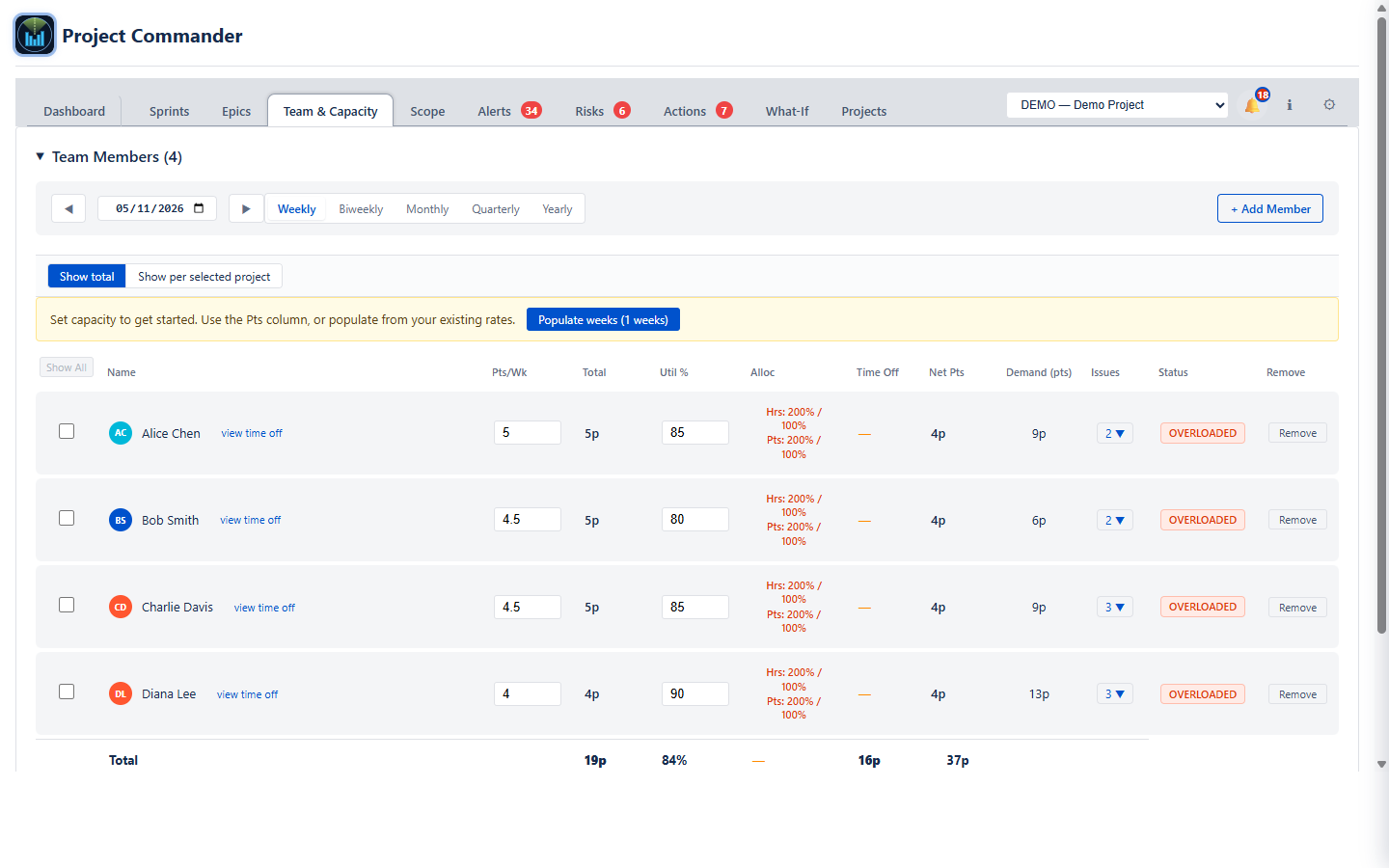
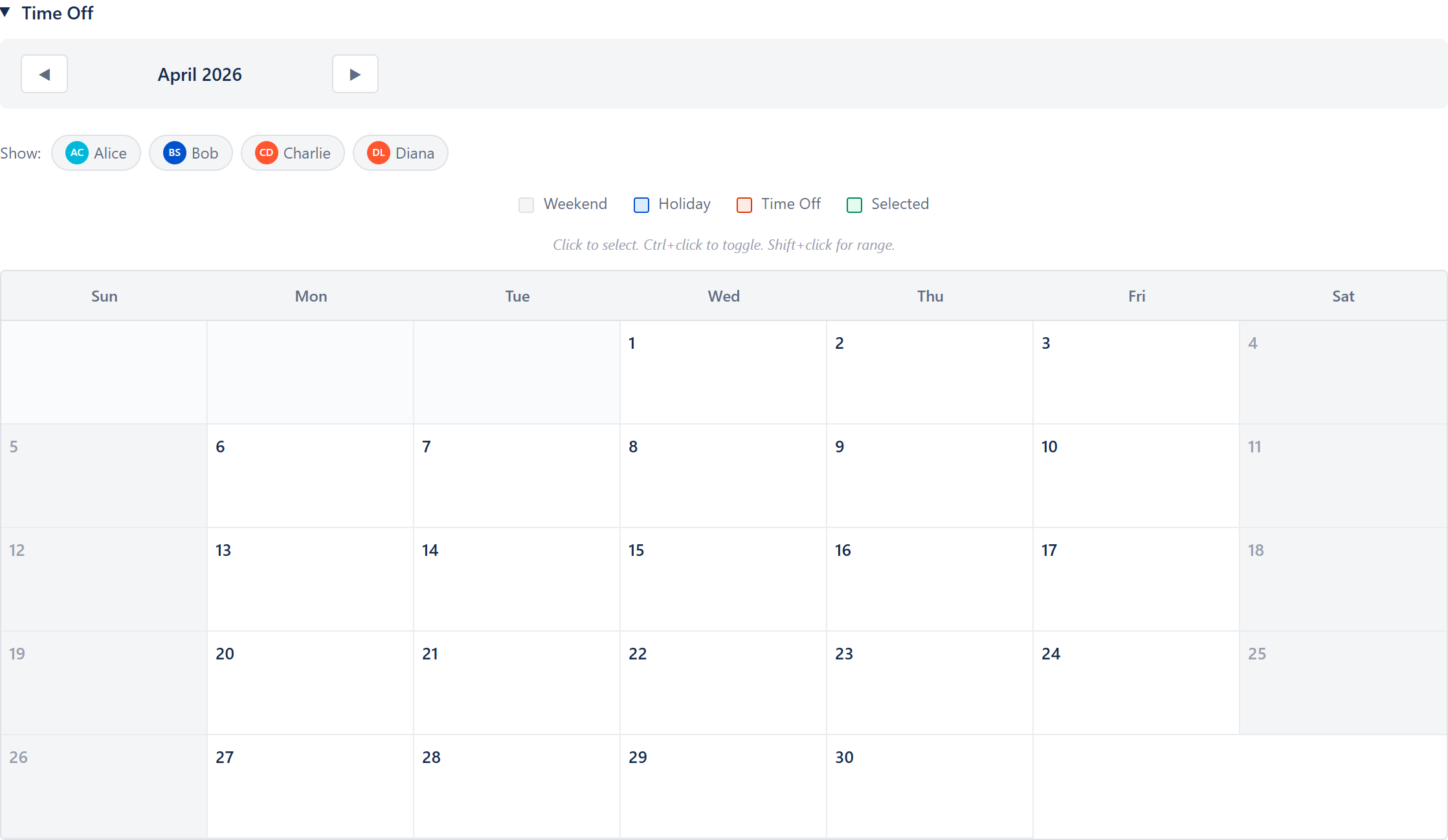
Real capacity per person, with time off taken out
Each person has their own weekly hours or points, not an even share of a team total, and their booked time off and company holidays are subtracted before anything is compared. Demand for each person is then shown against what they actually have.
Every sprint judged, including the one that is half over
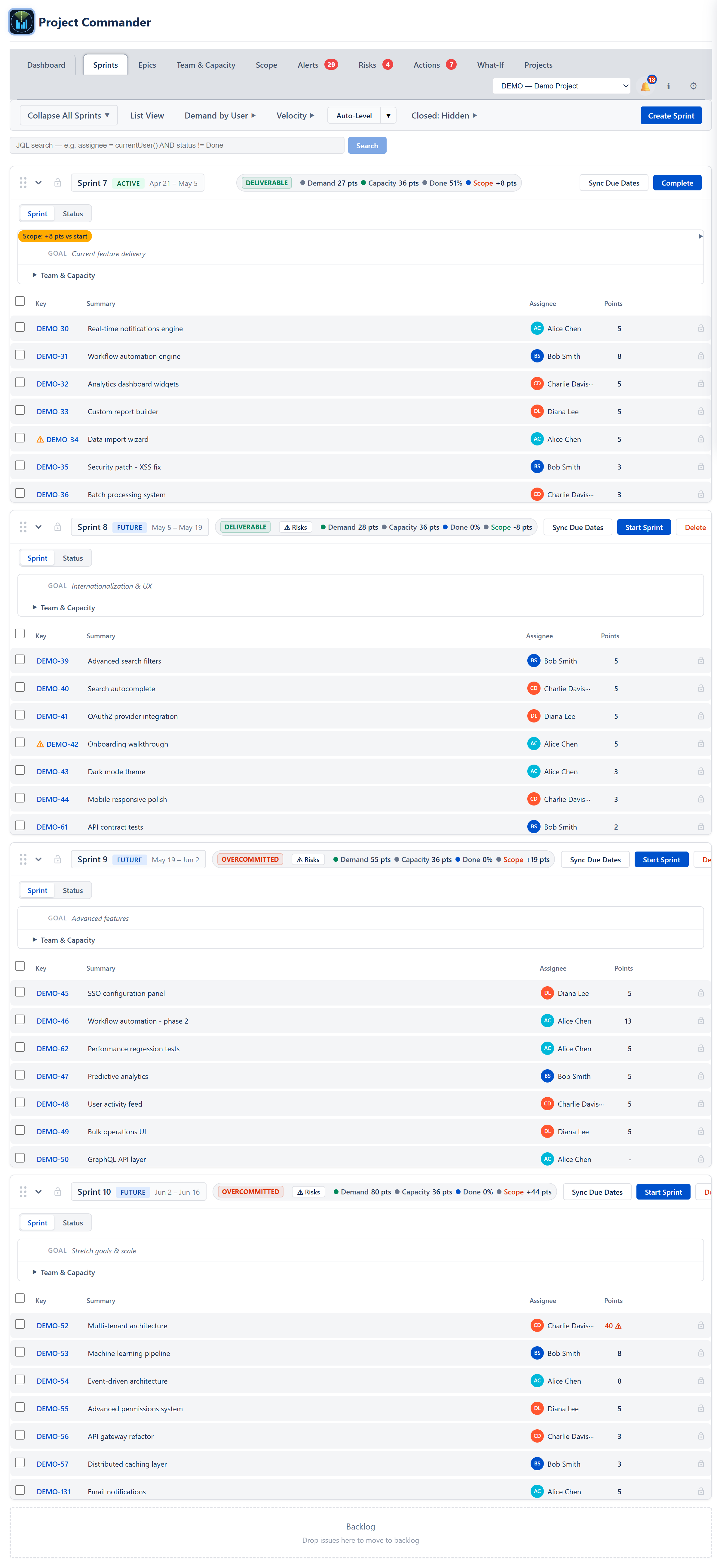
Each sprint gets a plain verdict — Deliverable, Tight, or Overcommitted — from comparing its demand to its real capacity. For a sprint already running, the comparison uses the work still open against the capacity still ahead, so the days already spent cannot make a stuffed sprint look healthy.
Demand and capacity over time, not just per sprint
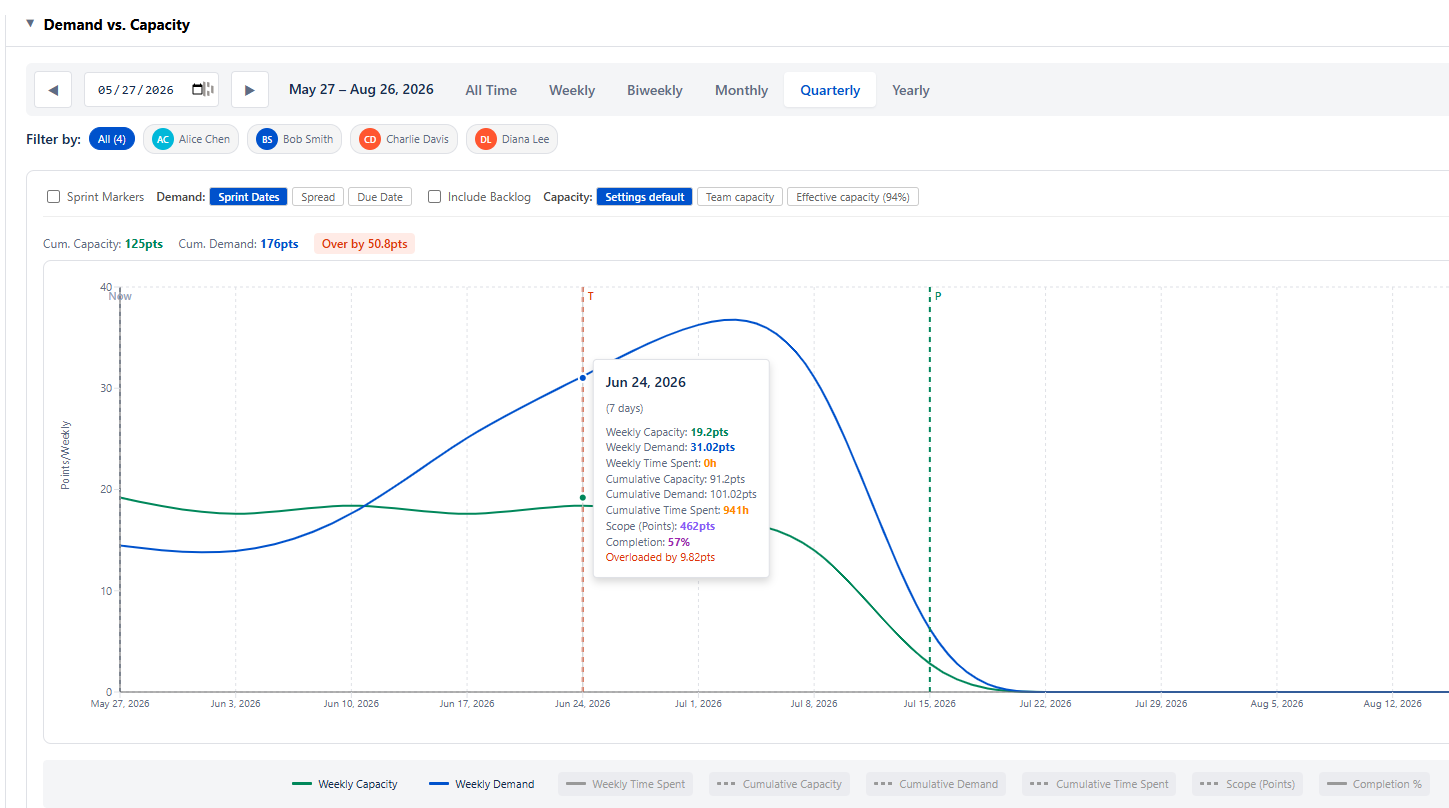
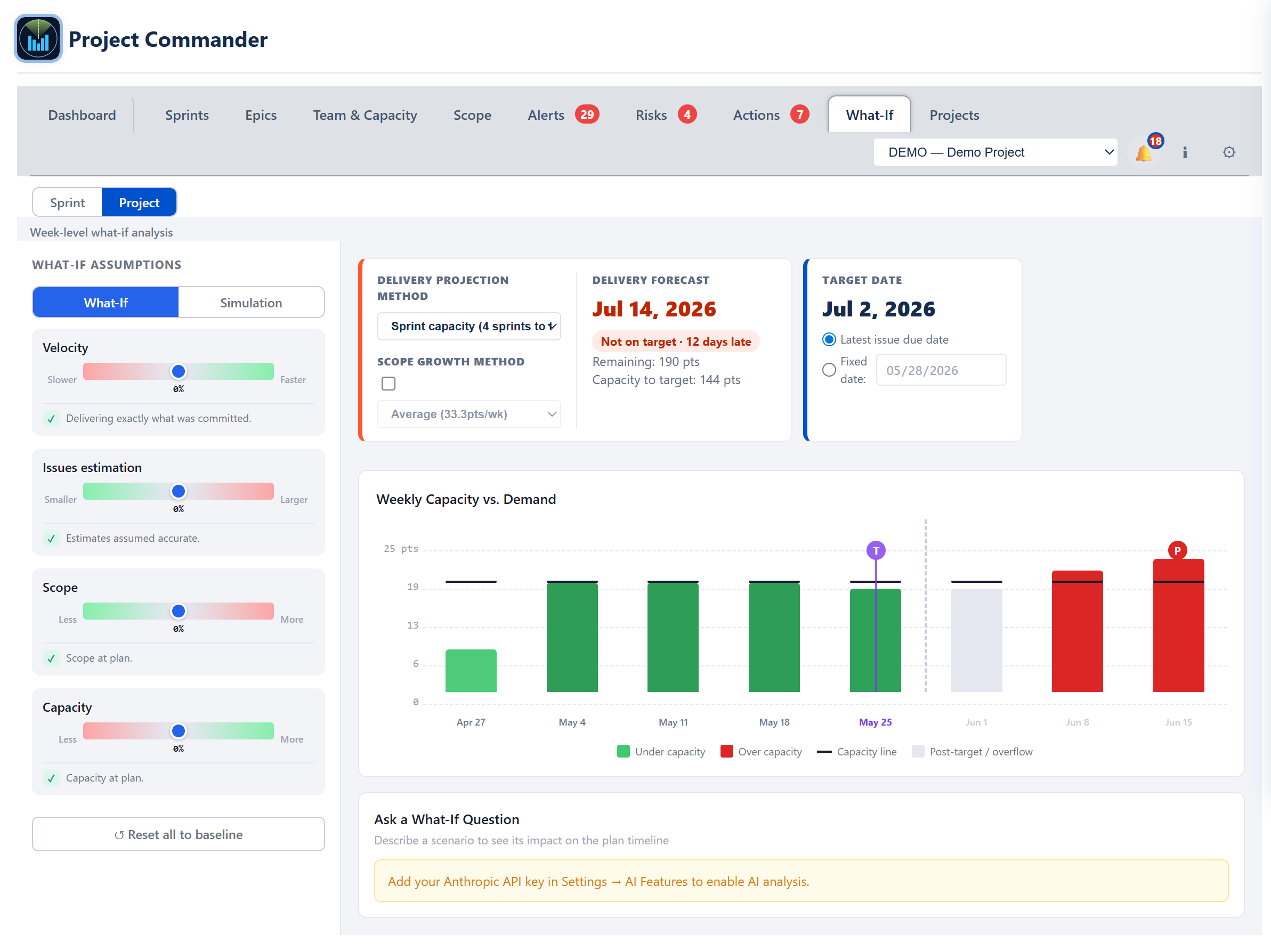
Overload rarely spreads evenly. A sprint can net out fine while one week inside it is badly over, because two deadlines and a holiday land together. Demand and capacity are plotted week by week so the pinch point is visible before the work is due.
It becomes a date
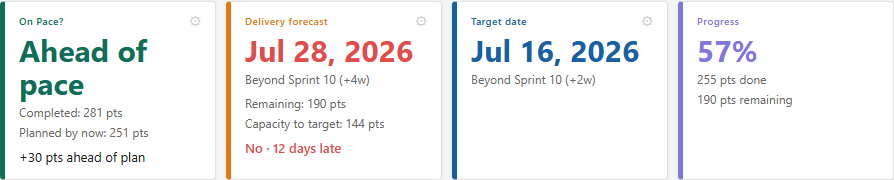
The same capacity picture produces a projected finish date and compares it to the date you have committed to. This is the part the capacity bars never reach: not "this sprint is over its limit", but "you will finish on 14 March and you promised 28 February".
You can test a fix before committing to it
When a sprint is overcommitted, work can be rebalanced across sprints in one step to see a plan that fits. And before you promise anything, you can try the change — another person, a later date, less scope — and watch what it does to the finish date.
Several projects sharing the same people
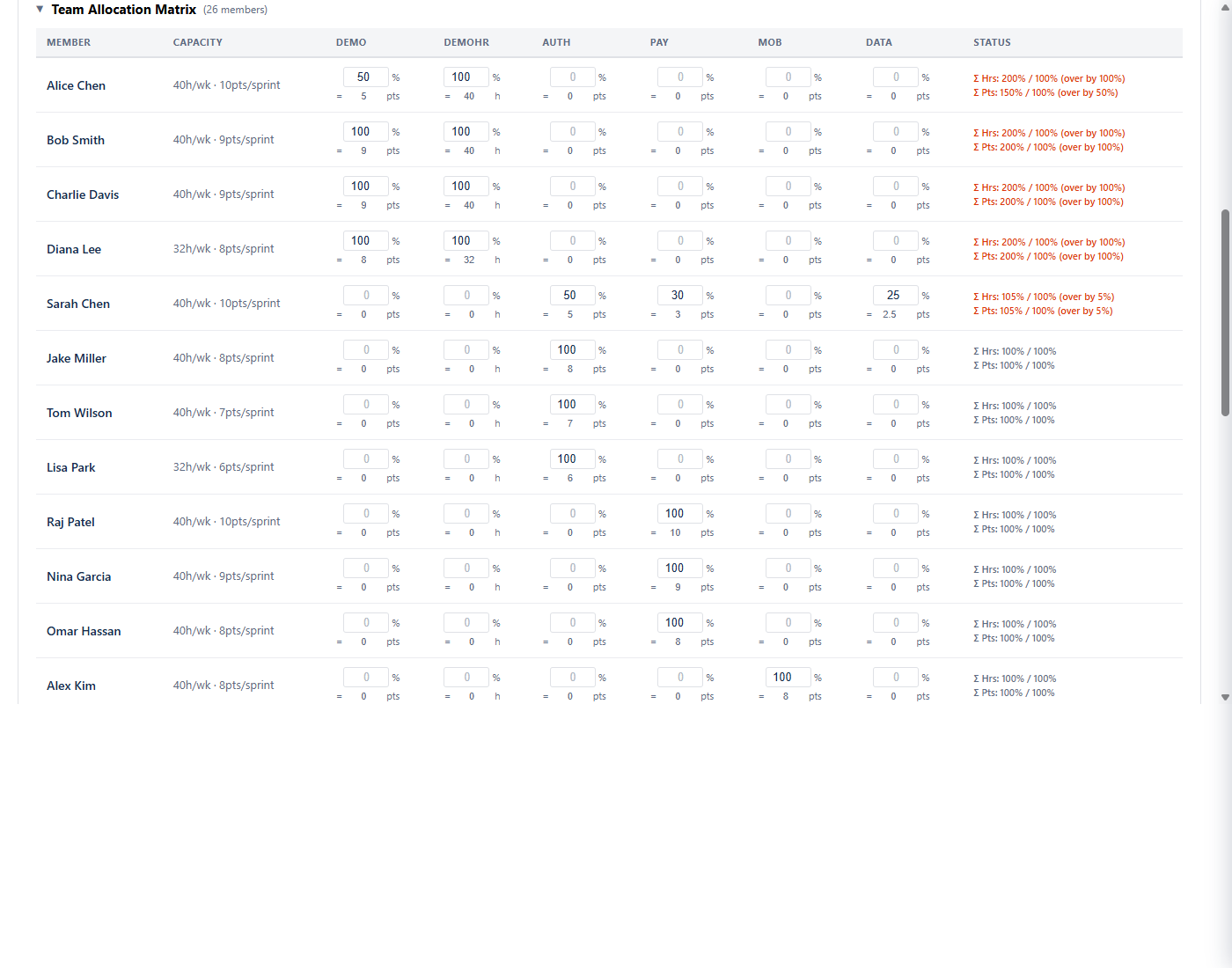
When projects share people, each project's plan can look healthy while the person appearing in both is committed twice over. The portfolio view rolls capacity and demand across every project so that double-booking is visible in one place.
Common questions
Do I need Jira Premium to do capacity planning?
To use Jira's own capacity features, yes — Plans is Premium and Enterprise only. Project Commander works on every edition, including Free and Standard.
Can I plan capacity per person in Jira?
On Premium and Enterprise, yes, with two caveats from Atlassian's own documentation: capacity plans assume a fixed 40-hour week and ignore your working-day settings, and holidays are not subtracted unless you enter them as work items.
Story points or hours — which should capacity be in?
Whichever your team already estimates in. The comparison is the same either way, because it always comes down to whether the work left fits the time left.
Why isn't average velocity enough?
Average velocity is one number for the whole team, taken from sprints where attendance was different. It cannot see that someone is on holiday next week, that one person has been given three times their share, or that half the current sprint has already gone.
See the whole picture
Capacity planning is one part of it. On the main site you'll find everything Project Commander does — the delivery forecast, threatened dependencies, and every project's health in one place — along with the interactive demo and the free install.
Related reading: Is your sprint plan realistic? The short version · Jira team velocity — the full guide · Jira velocity per person · All Project Commander features · Team & Capacity documentation