How to Catch Scope Creep in Jira Before It Blows Your Deadline
Project Commander is an add-on for Jira, not a replacement for it. It installs into your own Jira site, reads the projects, sprints, issues, people and links you already keep there, and leaves Jira as the place the work lives. The only things it stands in for are the planning and capacity features of Jira Premium and the delivery reporting of Rovo — see the side-by-side comparison.
Scope creep is not usually one big decision. It is a few points a sprint, added after planning, agreed by someone reasonable, and never counted. This is how to measure it in Jira using numbers already there, how to tell growth from discovery, and what to do once you can see it.
What it actually looks like
The version in project management books — a stakeholder demanding a large new feature halfway through — is the rare version, and the easy one, because everybody can see it and someone will push back.
The version that actually moves dates is smaller and unopposed. A bug found in testing, added to the current sprint because it is related. A "quick" change to something already being worked on. An item that turns out to need a second piece of work nobody knew about. A request from another team that takes an afternoon.
Each one is reasonable. None of them is worth an argument. And together they are six to ten points a sprint on a team that delivers thirty — a quarter to a third of everything the team does, going to work that was never in any plan.
The reason it survives is that nothing counts it. The sprint that finished everything it planned and still missed looks like a slow sprint rather than a sprint that grew.
Measuring it in Jira, in about ten minutes
The number is already in Jira and almost nobody looks at it.
- Open a company-managed Scrum project and go to Reports in the sidebar.
- Choose Sprint Report and pick a completed sprint from the dropdown.
- Look for the items marked with an asterisk. Atlassian's documentation is explicit about what that means: work items added to the sprint after it began.
- Add up their estimates. That is that sprint's growth.
- Repeat for the last six sprints and take the average.
Two things to know about the report before you rely on it. It only exists for Scrum boards in company-managed projects — team-managed projects and Kanban boards do not have it. And it is board-specific, counting only work matching that board's saved filter, with subtask estimates excluded.
If your project cannot use the sprint report, the same number can be reconstructed from issue history by looking at when each item entered the sprint, which is slower but gives the same answer.
Express the result as a percentage of velocity as well as an absolute figure. "Seven points a sprint" is a fact; "we add about 23% to every sprint after we have planned it" is the version that ends arguments.
Three kinds of growth, only one of which is a problem
Once you have the number, split it — because the three kinds need completely different responses and lumping them together is why the conversation usually goes nowhere.
Discovery: the work was always there, you just did not know
A piece of work turns out to need something nobody accounted for. This is not creep. It is the estimate being wrong, which is normal and expected. The right response is to expect a percentage of it, not to prevent it.
Defects: work that exists because earlier work was not finished properly
Bugs found in testing on work from this sprint or the last. Also not really new scope — it is the true cost of work already counted as delivered. If this category is large, the problem is not scope control, it is that "done" is being declared too early.
Genuinely new work
Something nobody asked for at planning, added because it was convenient to ask now. This is the only one of the three that is scope creep in the ordinary sense, and the only one that a boundary will fix.
The split matters because the standard advice — hold the sprint boundary, say no — only works on the third category. Applied to the first two it just moves the work to the next sprint while the date stays exactly where it was.
What it does to the date
This is where a small number becomes a large problem, and the arithmetic is worth doing explicitly.
A team delivering 30 points a sprint with 120 points of work left calls it four sprints. If scope grows 7 points a sprint, then over four sprints another 28 points arrive, which is roughly another sprint's worth. That sprint then grows too. The series settles at about six sprints, not four.
Put differently: a team that adds 23% to each sprint after planning is working at 77% of its apparent speed on the work it planned, and every forecast built on the apparent speed is wrong in the same direction, by more the further out it goes.
Which is why a forecast that ignores scope growth is not conservative or optimistic — it is systematically wrong, and it gets worse the more you rely on it.
What actually stops it
Count it, publicly. Most of the effect comes from measurement alone. A number in front of people at the sprint review changes behaviour that no policy changes, because the trade becomes visible: this arrived, so that did not happen.
Make the trade explicit at the moment of the request. Not "no", which invites an argument about priority. "Yes, and these three points come out to make room" — which puts the decision with the person asking, where it belongs.
Plan a smaller sprint on purpose. If seven points arrive every sprint, commit to twenty-three rather than thirty. The team delivers thirty either way; the difference is that the plan was right.
Fix the defect category separately. If a large share is bugs on recently completed work, no amount of scope discipline helps. That is a definition-of-done problem wearing a scope-creep costume.
Put the growth rate in the forecast. If it has happened for six sprints it will happen next sprint. A forecast that assumes it stops is a forecast that assumes today is different from every other day.
A worked example
Six sprint reports, asterisked items added up: 9, 4, 11, 6, 8, 7 points. Average 7.5 — a quarter of a 30-point velocity.
Split by kind: about 3 points of discovery, about 3 points of defects on recent work, about 1.5 points of genuinely new requests.
That split changes everything about what to do. The instinct — hold the boundary, push back on requests — addresses 1.5 points of the 7.5. The defect half, 3 points a sprint, is work being counted as done before it is done; that is the biggest single item and it is not a scope conversation at all.
And the plan: 120 points at 30 a sprint is not four sprints. With 7.5 arriving each sprint it is closer to six. Two sprints, found in ten minutes, before anyone promised anything.
Seeing it without the spreadsheet
Project Commander is a Jira app that tracks scope against your live project and carries the growth into the forecast. It works on every Jira Cloud edition, including Free and Standard.
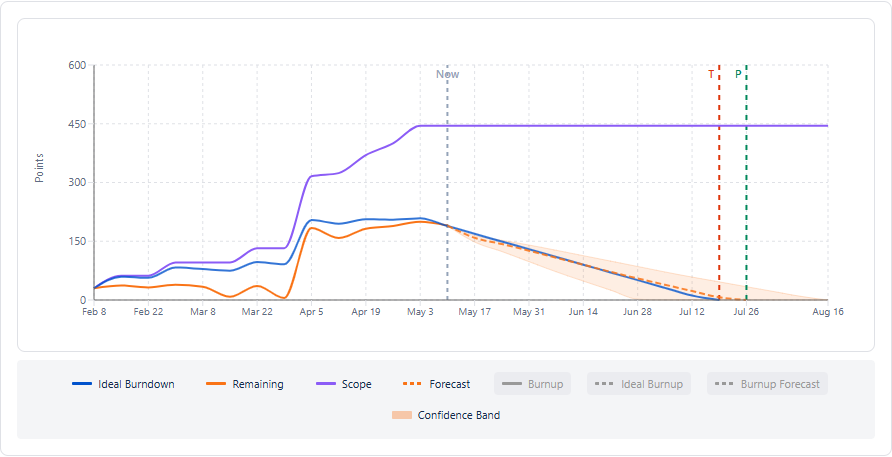
Scope over time, against what has been delivered
Total scope plotted sprint by sprint alongside completed work, so growth is a line that goes up rather than a number nobody adds up.
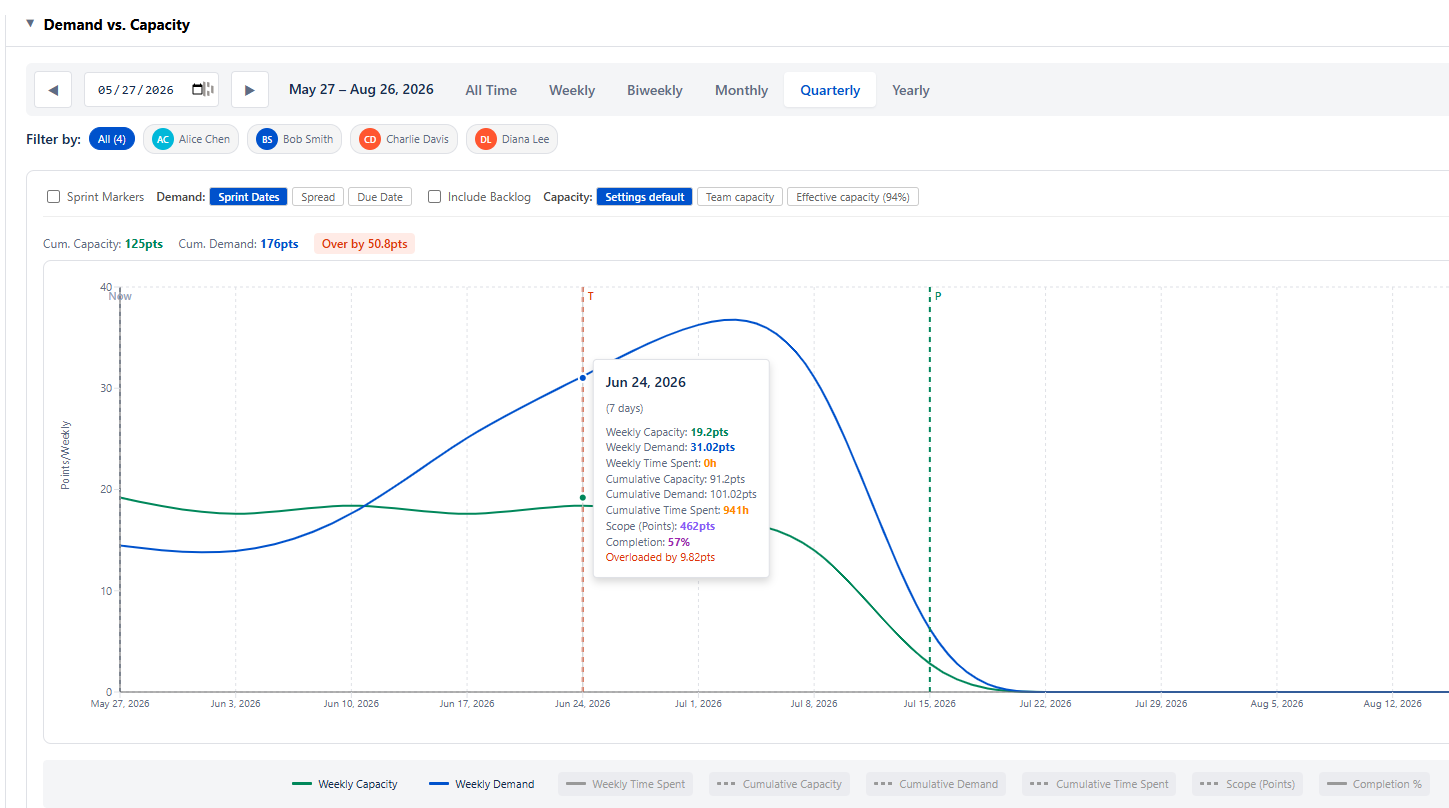
What the growth does to capacity
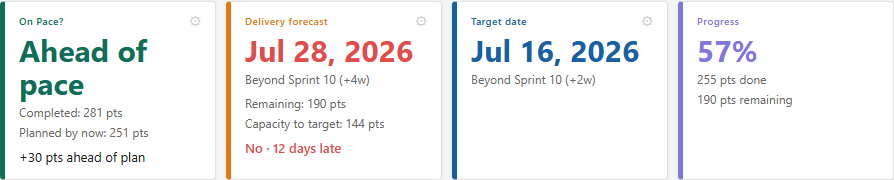
And what it does to the date
The forecast is built from the work that is actually there now, not the work that was there at planning, so growth shows up as the date moving rather than as a surprise at the end.
See where scope crept in on a real project
Project Commander is a free Forge app on the Atlassian Marketplace — it installs in about two minutes and reads a live Jira project right away. Or try the interactive demo first, no install needed.
Related reading: Sprint capacity planning in Jira · Jira team velocity — the full guide · All Project Commander features