How to Rebalance an Overloaded Sprint in Jira
Project Commander is an add-on for Jira, not a replacement for it. It installs into your own Jira site, reads the projects, sprints, issues, people and links you already keep there, and leaves Jira as the place the work lives. The only things it stands in for are the planning and capacity features of Jira Premium and the delivery reporting of Rovo — see the side-by-side comparison.
This is a guide to rebalancing an overcommitted sprint in Jira: how to work out how much has to come out, how to choose what goes, the four constraints that make a rebalance safe, and how to tell whether it actually helped the date. Every statement about Jira here comes from Atlassian's own documentation.
Step 1: work out how much has to come out
Not "it feels heavy" — a number. Take the sprint's demand and subtract the capacity that is genuinely available, and the difference is what has to leave.
Two things people get wrong here.
Use the capacity you have, not the team's nominal size. If two of five people are away for three days of a two-week sprint, the sprint does not have its usual capacity. Note that Jira's own plans divide a team's capacity evenly between its members and, for individual capacity planning, assume a fixed 40-hour week that does not reflect your working-day settings, with no automatic subtraction of holidays — so the number a plan shows you may already be optimistic.
If the sprint has already started, use what is left of it. Six days into a ten-day sprint, roughly 60% of the capacity is gone whether or not the work went with it. Judging the remaining work against the full sprint capacity will tell you far less has to come out than really does.
Step 2: decide what goes, and by what rule
"Take some work out" is ambiguous until you say by what rule, and different rules give different, defensible answers. Pick one deliberately rather than moving whatever is nearest the bottom of the board.
- By priority — keep the most important work, move the rest. The right default when the sprint has a clear business purpose.
- By size — move one large item rather than five small ones. Fewer things disturbed, less re-planning, and it often removes the single item that was making the sprint impossible.
- By due date — keep whatever has a real deadline inside this sprint, move what does not. The right rule when dates are attached to individual pieces of work.
- By who is overloaded — if the sprint total is fine and one person is at 150%, the fix is not to shrink the sprint. It is to move that person's work, either to someone with room or to a later sprint.
That last one is the case most often mishandled. When one person is the problem, trimming the sprint evenly leaves them just as overloaded in a smaller sprint.
Step 3: the four constraints a safe rebalance respects
Capacity, in every sprint you touch
Moving work out of sprint 7 and into sprint 8 is not a fix if sprint 8 was already at its limit. A rebalance has to hold every affected sprint inside its capacity, not just the one you started with.
Dependencies
Work cannot be scheduled before the thing it depends on. Push an item back and you may have moved it in front of nothing — or you may have just created a sprint where two items block each other. This is the constraint that manual shuffling breaks most often, because issue links are not visible while you are dragging rows.
Anything committed or locked
Some work is not movable: it was promised to a customer, it is tied to a release, it is a dependency for another team. Those items need to be fixed in place before anything else moves around them.
Items too big to fit anywhere
An item estimated above a single sprint's capacity for one person will not fit in any sprint you move it to. Rebalancing cannot solve it; it needs breaking up, and the rebalance should say so rather than quietly parking it somewhere.
Step 4: where it goes, without breaking the next sprint
The most common mistake is treating the next sprint as a container with infinite room. Work pushed out of an overcommitted sprint into the following one usually makes that one overcommitted, and the problem walks forward through the plan, arriving at the end as a missed date.
Spread across several sprints rather than all into the next one, and check the state of each sprint after the moves, not just before.
Step 5: check whether it helped
This is the step that gets skipped, and it is the only one that tells you whether the exercise was worth doing.
Tidier bars are not the goal. The goal is the delivery date, and it is entirely possible to spend an hour rebalancing and move the finish date by a day, because the work did not disappear — it moved. If the total work is more than the total capacity between now and the target, rearranging it changes when things happen, not whether they finish on time.
That is a genuinely useful thing to discover, because it tells you the answer is not rebalancing at all. It is scope, people, or the date — and that is a conversation to have early rather than in the last week.
A worked example
Sprint 7, two weeks, five people. Demand 47 points. Nominal capacity 40, but one person is away for four days, so the real capacity is about 33. It is day four, so roughly 60% of the sprint remains — about 20 points of capacity against 41 points of open work.
Twenty-one points have to come out, not the seven that the demand-against-nominal-capacity sum suggested.
What goes: a 13-point item assigned to the person who is already at 150% of their own load, and an 8-point item with no deadline this sprint. That is 21, in two moves rather than six.
Where it goes: the 8-pointer to sprint 8, which has room. The 13-pointer cannot go to sprint 8 because it is blocked by an item scheduled there — it goes to sprint 9, after its dependency.
The check: the finish date moves from 14 March to 11 March. Three days. The work still exists and there is still more of it than there is capacity before the target, so the real answer is a scope or staffing conversation, and the rebalance bought a little room while that happens.
Doing it in one step
Project Commander runs all five steps against your live Jira project. It works on every Jira Cloud edition, including Free and Standard.
It knows which sprints are over, and by how much
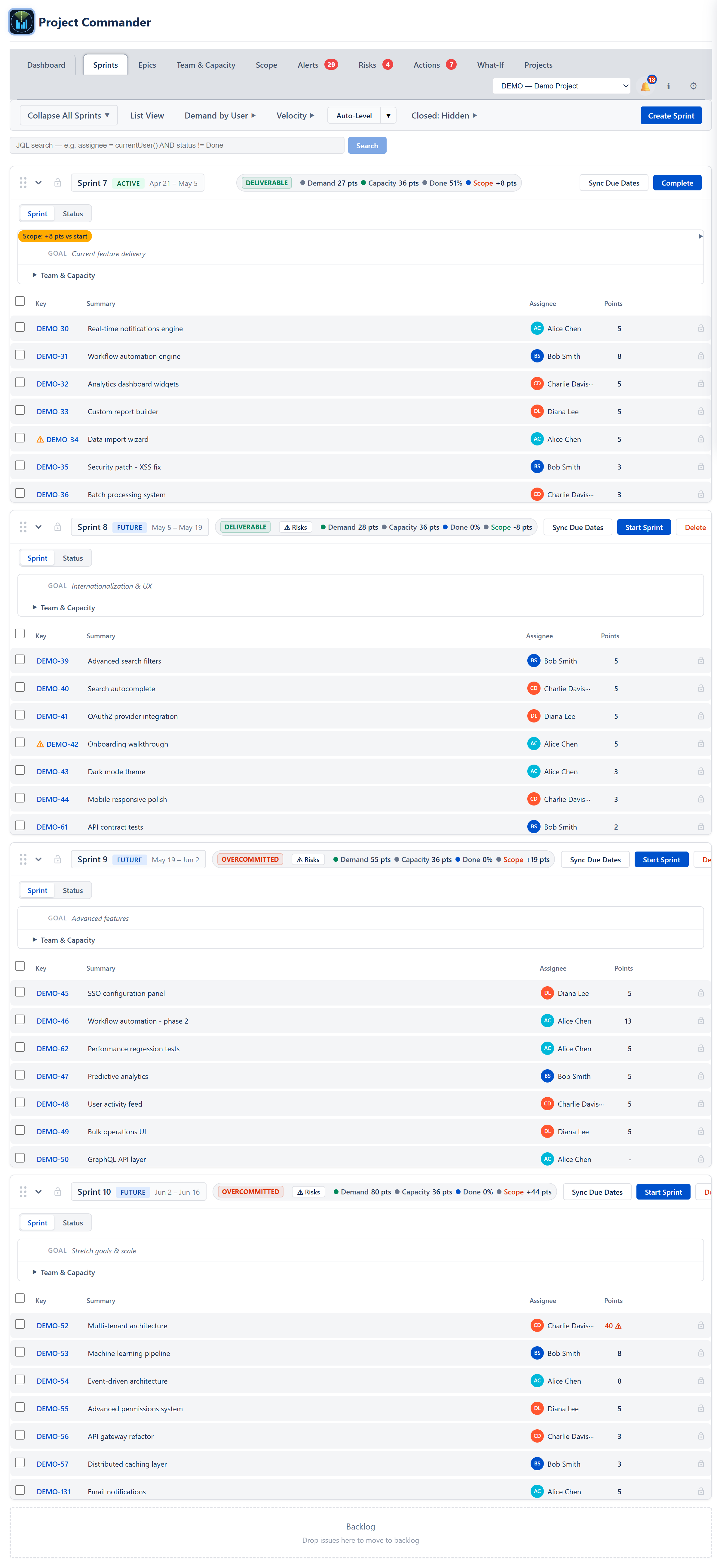
You pick the rule, it proposes the moves
Choose Priority, Size, Due Date, or Balanced — or compare all four side by side — and it produces the moves without exceeding any sprint's capacity, honouring locked items and dependencies, and judging an active sprint on its remaining capacity.
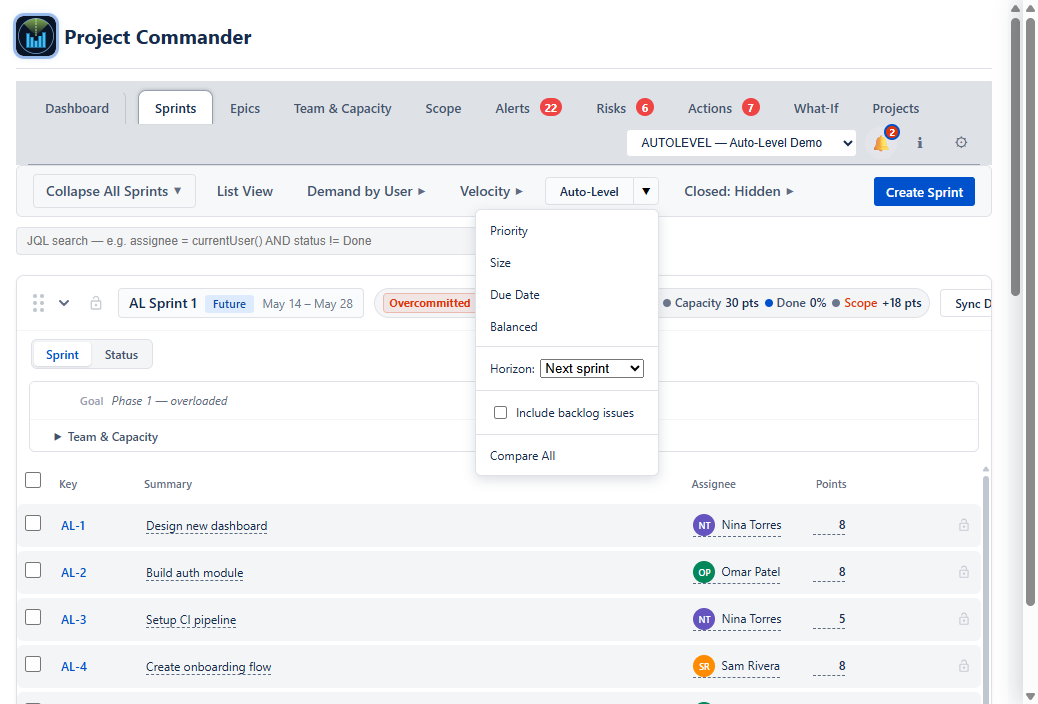
Nothing is written to Jira until you have seen it
The proposal is a dry run: this issue, from this sprint to that one, with the projected on-time change shown before you apply. Items too big for any sprint are flagged for you to break up rather than parked somewhere.

And whether it moved the date

Rebalance a sprint in one click
Project Commander is a free Forge app on the Atlassian Marketplace — it installs in about two minutes and reads a live Jira project right away. Or try the interactive demo first, no install needed.
Related reading: Sprint capacity planning in Jira · Jira team velocity — the full guide · All Project Commander features