Why Do Sprints Keep Slipping? Six Causes, and How to Tell Which Is Yours
Project Commander is an add-on for Jira, not a replacement for it. It installs into your own Jira site, reads the projects, sprints, issues, people and links you already keep there, and leaves Jira as the place the work lives. The only things it stands in for are the planning and capacity features of Jira Premium and the delivery reporting of Rovo — see the side-by-side comparison.
Sprints that keep finishing late are almost never a discipline problem, and the fix is almost never to try harder. This is a guide to the six reasons sprints slip repeatedly, how to tell which one is yours using numbers already in Jira, and what actually stops each.
- What it is not
- 1. You are planning at full capacity
- 2. The team average hides one overloaded person
- 3. Scope arrives after the sprint starts
- 4. Work is waiting on other work
- 5. One item is bigger than the sprint
- 6. Carry-over has become permanent
- Which one is yours
- Seeing all six before the sprint starts
What it is not
Before the six: if sprints slip most of the time, it is worth ruling out the explanation everyone reaches for first. Teams that repeatedly miss are usually not slower than they think and not less disciplined than they should be. They are accepting plans that were not achievable on the day they were agreed.
The test is simple. Take your last six sprints. If the team finished roughly what it committed to in four or five of them, you have ordinary variation and there is nothing structural to fix. If it finished less in five of six, the commitment is the problem, not the execution — and no amount of standup pressure fixes a plan that never fitted.
1. You are planning at full capacity
What it looks like: every sprint is planned to roughly the team's velocity, and every sprint lands a bit short.
Jira's velocity chart draws two bars per sprint: grey for everything in the sprint when it started, green for what was finished. Most teams read the green bar and plan the next sprint against it. The useful number is the ratio between them. A team whose green is consistently around 70% of its grey is telling you something exact — whatever this team commits to, about seven tenths gets done — and planning the next sprint at 100% of the commitment builds the same 30% shortfall in before anyone starts.
The fix: plan to the delivered figure, not the committed one. If you finish 80% of what you commit to, commit to 80%. Sprints stop slipping not because the team got faster but because the plan stopped being fiction.
2. The team average hides one overloaded person
What it looks like: the sprint total is comfortably inside capacity, and the same one or two pieces of work carry over every time.
A team velocity of 30 across five people is not five people doing six. It might be two people doing eleven each while a third is blocked. The sprint looks fine as a total, and it is impossible for the person carrying thirteen points of it.
This is made worse by how Jira handles capacity in a plan: it attaches capacity to the team, then divides it evenly between the people in it. A team's capacity for an iteration divided by the number of people is what each person is assumed to have — so your part-time developer, your tech lead who spends half her week in meetings, and your newest joiner are all given the same amount.
The fix: check the load per person before the sprint starts, not the total. One person over 115% of their own capacity is enough to make the sprint miss, whatever the total says.
3. Scope arrives after the sprint starts
What it looks like: the team finishes everything it planned and the sprint still misses.
This one is measurable and almost nobody measures it. Jira's sprint report marks any work item added after the sprint began with an asterisk. Open the last six sprint reports, add up the asterisks, and you have your average scope growth per sprint.
If that number is eight points a sprint and your velocity is thirty, you are not planning a thirty-point sprint. You are planning a thirty-eight-point sprint and calling it thirty.
The fix: two options and they work together. Either hold the sprint boundary properly, so new work waits for the next sprint unless something comes out to make room. Or accept that the work arrives and leave room for it — plan to twenty-two so that the eight that arrives still fits. What does not work is planning to thirty and hoping.
4. Work is waiting on other work
What it looks like: people have capacity and things still are not moving. Work sits in progress without progressing.
Capacity is not the only constraint. If a piece of work cannot start until something else finishes, having time available does not help. Two problems cause most of it: work scheduled before the thing it depends on, and pairs of items that block each other, where neither can be first.
Both are visible in Jira's issue links, and neither shows up in any capacity number. A sprint can be comfortably inside capacity and still be undeliverable because of the order.
The fix: before the sprint starts, check that nothing in it is blocked by something scheduled later, and that no two items block each other. It takes minutes and it is the single most common invisible cause.
5. One item is bigger than the sprint
What it looks like: one large item carries over sprint after sprint while everything around it completes.
An item estimated at more than one person can do in a sprint cannot finish in that sprint, and no plan that contains it is achievable. It usually survives several sprints because each time it moves it looks like a scheduling decision rather than an estimation problem.
The fix: any item at or above a whole sprint's capacity for one person gets broken up before it is committed to. If it cannot be broken up, it is not a sprint item and the plan needs to say so.
6. Carry-over has become permanent
What it looks like: every sprint starts with unfinished work from the last one, and the amount slowly grows.
A little carry-over is normal. Carry-over that grows is a plan that is running a small deficit every sprint, and deficits compound. Two sprints of five points carried over is ten points of work the plan never accounted for, sitting in front of the next sprint.
The fix: treat carry-over as a first charge against the next sprint's capacity rather than as a bonus item. If eight points carry over and capacity is thirty, the sprint has twenty-two points of room for new work, not thirty.
Which one is yours
You can tell them apart from your own data, and the answer is usually one or two rather than all six.
| What you see | Most likely cause |
|---|---|
| Green bar consistently well below grey, every sprint | Planning at full capacity |
| Sprint total fine, same person's work always carries over | One person overloaded |
| Everything planned got done, sprint still missed | Scope arriving mid-sprint |
| People free, work not moving | Blocked by other work |
| One large item moving sprint to sprint | Item bigger than a sprint |
| Unfinished work at the start of every sprint, growing | Carry-over compounding |
Every one of those is in Jira already. The reason they go unnoticed is that each lives on a different screen, and none of them is on the one you look at during sprint planning.
Seeing all six before the sprint starts
Project Commander is a Jira app that checks all six against your live project, before the sprint begins rather than after it ends. It works on every Jira Cloud edition, including Free and Standard.
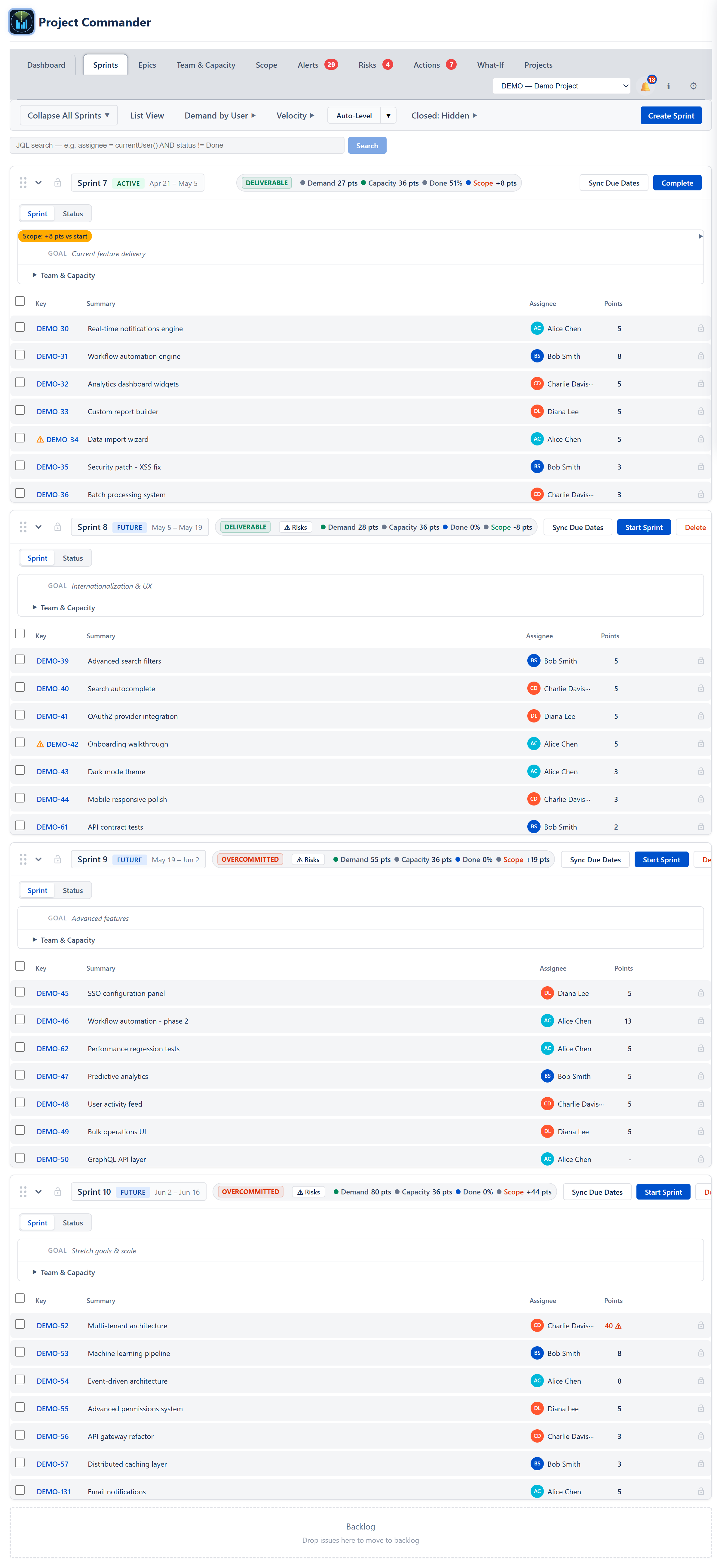
Each sprint judged against capacity that is actually available
Every sprint gets a plain verdict — Deliverable, Tight, or Overcommitted — and an item larger than a whole sprint is flagged where it sits. For a sprint already running, the comparison uses the work still open against the days still ahead.
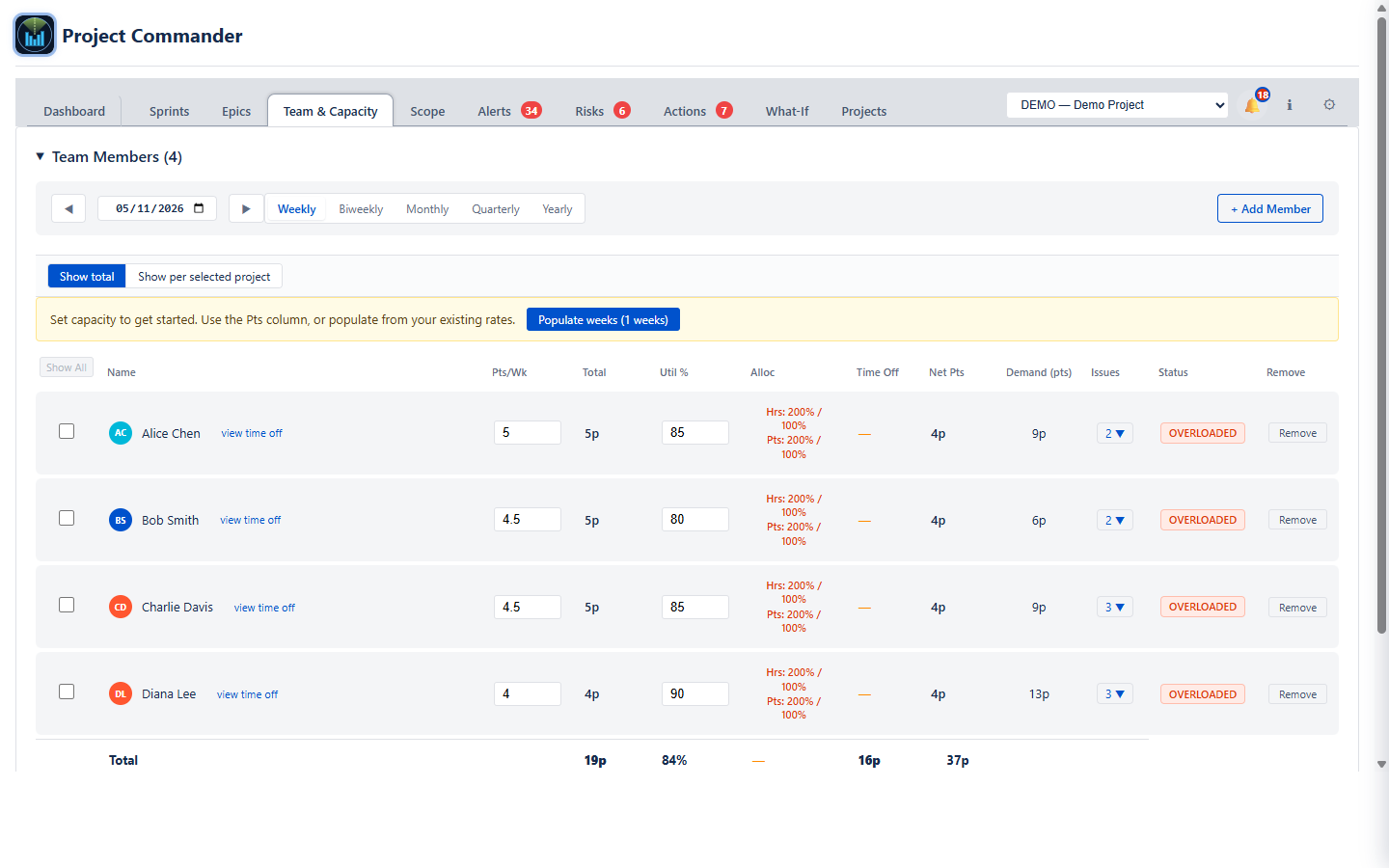
Load per person, not the team total
Each person's demand against their own capacity, with leave and company holidays already taken out, so the overload the total hides is visible.
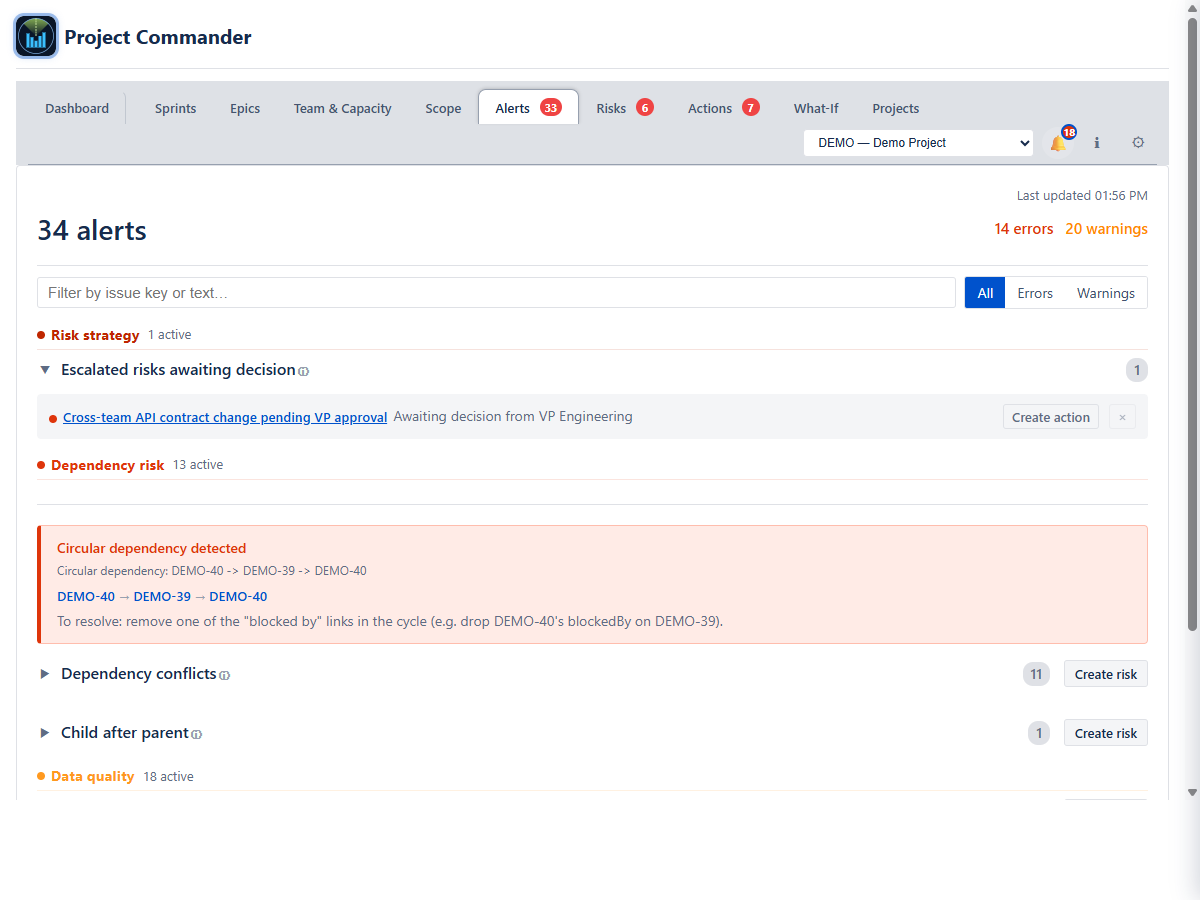
The work that is waiting on other work
Dependencies read from your issue links, with work scheduled before the thing it depends on, and pairs that block each other, called out.
And what it all does to the date
The same six causes produce one number that matters to everyone outside the team: the projected finish date, next to the one you committed to.

Keep your plan connected to reality
Project Commander is a free Forge app on the Atlassian Marketplace — it installs in about two minutes and reads a live Jira project right away. Or try the interactive demo first, no install needed.
Related reading: Jira team velocity — the full guide · Sprint capacity planning in Jira · All Project Commander features