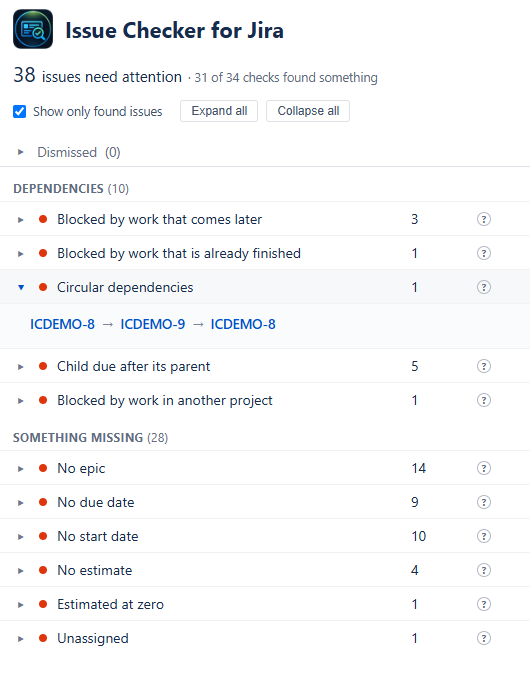
The thirty-four checks
Every check is listed whether or not it found anything. Click one and the issues behind the count appear under it, each by key, with a short note saying why it was found.
Dependencies (5)
- Blocked by work that comes later
- Blocked by work that is already finished
- Circular dependencies
- Child due after its parent
- Blocked by work in another project
Something missing (7)
- No epic
- No due date
- No start date
- No estimate
- Estimated at zero
- Unassigned
- The same summary twice
Dates and sprints that disagree (5)
- Carried over more than once
- Still open in a sprint that has closed
- Waiting, and its date has passed
- Due date outside its sprint
- Due date before its start date
Estimates (14)
- Not started, but time logged
- Done, with no time logged
- In progress, nothing logged
- Nothing remaining, still open
- Remaining estimate never goes down
- Over its estimate and still open
- Heading well past its estimate
- No original estimate to measure against
- Done, but Jira holds no resolution
- Resolved, but open again
- Abandoned, but still in a sprint
- Resolved, with time still on it
- Resolved before it started
- Settled a way this project never otherwise settles work
Looks finished, is not (3)
- Done, with work still on it
- Parent closed while its children are open
- Overdue
Your own checks
Give a check a name and a Jira filter, written the way you would in Jira's own search box. Test asks Jira whether it accepts the filter and how many issues match right now. Your checks sit at the foot of the list and count in the headline like any other.
Only the checks you care about
A list of problems is only useful if it is your problems. Issue Checker lets you cut it down to exactly that, and your choices change nothing for anyone else looking at the same project.
Choose which checks run
Every check has a tick. Untick the ones that do not fit how your team works, and they leave the list and every count. A team that plans in story points can switch off the checks about logged time.
Dismiss what you have accepted
Looked at a finding and decided to live with it? Dismiss it, and it comes off its check and off the headline. It is not lost: the Dismissed list keeps every one, with the check that found it, and Restore puts it back.
Put them in your order
Drag checks into the order you want within their group, or have the ones that found the most float to the top. Tick "Show only found issues" and the quiet checks step aside.
Clean issues are the start. Next: will the plan fit?
Once the issue fields are right, Project Commander, from the same maker, sets the work against the capacity your team really has and tells you whether the plan lands on its date. Nine of Issue Checker's checks are the same checks its Alerts tab runs, asked of the same engine, so the two never give different accounts of one project.
See Project Commander →